Participant
September 8, 2025
Answered

How to Select Text in All Pages at Once

  • September 8, 2025
  • 2 replies
  • 757 views

I would like to increase the stroke weight of all text across a manuscript.  Do I need to select the text on one page at a time to change it, or is there another way?  Is there a way to change all the text at once?  One page at a time may produce errors, and if I need to change it again may become laborious.  
Any help would be appreciated.
Thank you very much.

Adam

Correct answer Barb Binder

Hi Adam:


You can select all of the text across multiple pages by clicking in the text with the Type tool, and choosing Edit > Select all... if the text is in a series of threaded text frames.


If you have designed the document with multiple threaded frames (or worse, disconnected frames) you will need to repeat this multiple times... unless you are using paragraph styles. 


If you are using paragraph styles, you can just edit the style definition(s). When using paragraph styles, be sure to create a base style, so that changing its definition will roll though the other styles.
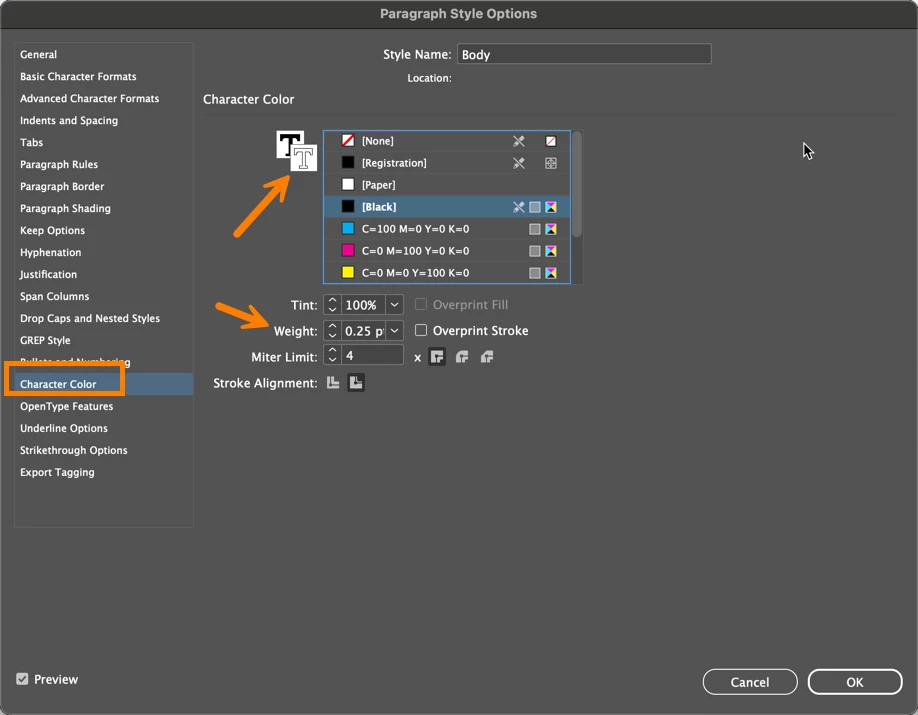


As someone who specializes in long document layout, I learned the hard way to design my files to be ready for all those last minute formatting adjustments that almost always start with, "Hey Barb, did I tell you you need to update X?" And when they phrase it that way, we both know haven't mentioned it yet.


Primary frames are worth adding to the list because page size and margin changes come up just as often.


~Barb

2 replies

Community Expert
September 11, 2025

Hi @adam_3959 ,

in addition what @Barb Binder said, you could also you Find/Change for changing the stroke weight of all texts in your document. But be aware, that you have to change 2 values for doing this: [1] Stroke weight of course, but also [2] stroke color.

If you do only stroke weight you end up with an invisible stroke weight where the value is applied but will not be indicated by the Stroke Panel. The Stroke Panel will still show, falsely, 0 Pt if you went out from the default situation with no stroke applied to the text…


Some sample screenshots from my German InDesign.

Stroke weight applied, but NOT stroke color. Stroke weight's not visible:


Stroke panel is showing no weight ( 0 Pt ), but you'll find text with stroke weight applied:


IDML file of the document showing in the screenshot above is attached:

AllText-INDD-20-6-0-StokeAppliedWithFindChange.idml


Regards,
Uwe Laubender
( Adobe Community Expert )

Barb Binder
Community Expert
Barb BinderCommunity ExpertCorrect answer
Community Expert
September 8, 2025

Hi Adam:


You can select all of the text across multiple pages by clicking in the text with the Type tool, and choosing Edit > Select all... if the text is in a series of threaded text frames.


If you have designed the document with multiple threaded frames (or worse, disconnected frames) you will need to repeat this multiple times... unless you are using paragraph styles. 


If you are using paragraph styles, you can just edit the style definition(s). When using paragraph styles, be sure to create a base style, so that changing its definition will roll though the other styles.


As someone who specializes in long document layout, I learned the hard way to design my files to be ready for all those last minute formatting adjustments that almost always start with, "Hey Barb, did I tell you you need to update X?" And when they phrase it that way, we both know haven't mentioned it yet.


Primary frames are worth adding to the list because page size and margin changes come up just as often.


~Barb

~Barb at Rocky Mountain Training
adam_3959Author
Participant
September 8, 2025

Thanks for the reply - I appreciate that.
For some reason, when I Select All now it selects all text - it did not do this before I don't believe.
Thank you.

Barb Binder
Community Expert
Community Expert
September 9, 2025

Just a guess... you can use Select All with the Type tool + insertion point, or with just the Type tool or the Selection tool. You need that blinking insertion point in the story for Select All to work across pages.


~Barb

~Barb at Rocky Mountain Training