
Known Participant
March 2, 2023
Question

How to seperate frames, correctly..?
  • March 2, 2023
  • 3 replies
  • 1273 views

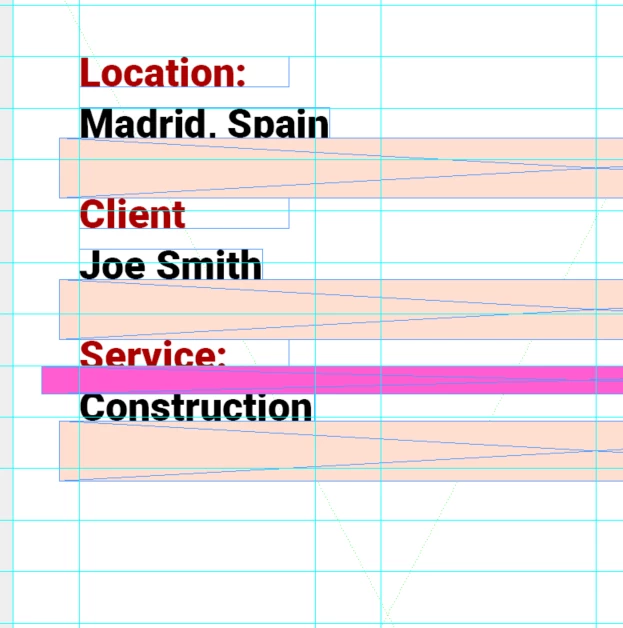
Please see example of the work I am doing above

I am trying to seperate these frames of text equally however, the most intuitive way I have thought of is making spacers on a show only layer and then using them as equal spacers to get the desired effect

Is there any other better way of doing this as it takes time and it doesnt feel like the correct most accurate way


Please ignore my grid lines

Thanks

This topic has been closed for replies.

3 replies

Barb Binder
Community Expert
Community Expert
March 2, 2023

One more clarification:


Paragraph styles are used to control the formatting for an entire paragraph, character styles are used to control the formatting for selected words within a paragraph. As a general rule, you do not assign a character style to entire paragraph.


In your screen shots, you are showing us a situation where you should be using two paragraph styles: one for the red text and one for the black text as per @SJRiegel. I do not see any reason to use a character style and yes, you will have to click in each paragraph and assign a paragraph style. That's true in any document in InDesign, not just in yours.


~Barb

~Barb at Rocky Mountain Training
Legend
March 2, 2023

Is there a reason that each of these needs to be in its own text frame? 

You can acheive the same spacing (within a single text frame) far more easily by using a combination of slightly tightened leading on the black text and a Space Before Paragraph setting on the red text. 


Known Participant
March 2, 2023

Yes but what about my paragraph and charater styles? 

I am using them in this project

Legend
March 2, 2023

You would add the paragraph spacing to the Paragraph style for the red text, and the leading adjustment to the style for the black text.

Barb Binder
Community Expert
Community Expert
March 2, 2023

Hi @Aidan28610574w1n9:


Yes, Adobe has distribution commands in the Align panel that will accomplish this quickly. Be sure to read the link below first though. And come back and ask us if you have any follow up questions.


https://helpx.adobe.com/indesign/using/aligning-distributing-objects.html 


~Barb

~Barb at Rocky Mountain Training