Inspiring
June 17, 2020
Question

How to set same size to multiple text frames

  • June 17, 2020
  • 4 replies
  • 1281 views

Hi.


I'm working into a long document imported from Word, the import generates about 600 pages, but now I want to change the text frames to another size... How I can to set the all text frames of this document to same size: width and height? 


EDIT:


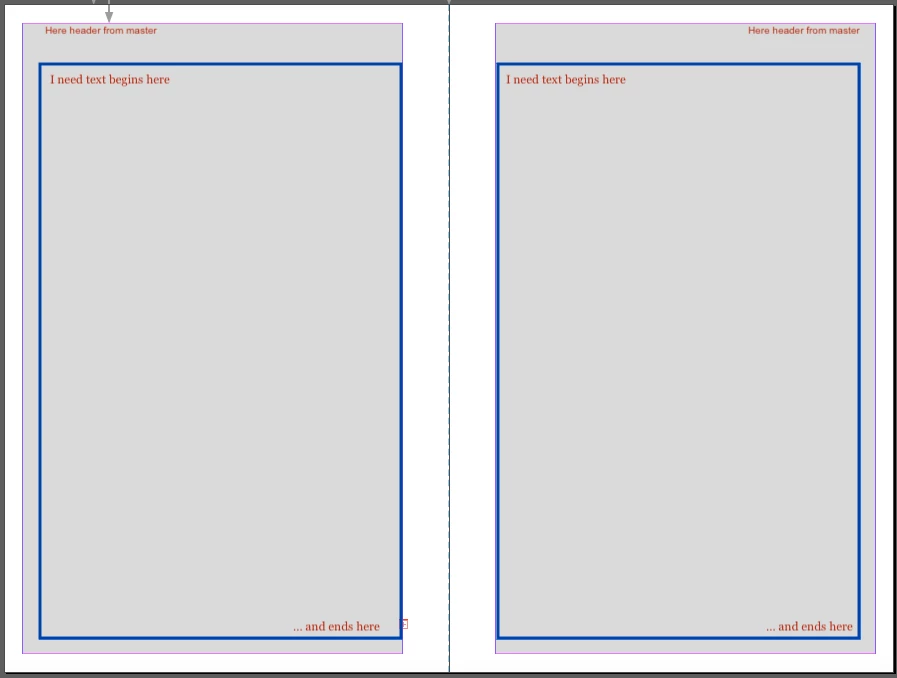
I'm working with the plugin Blurb Book Creator for publish this book at Blurb, then the left and right pages are different and i want to preserve this, but i want more space  separating header and body, and separating outside margin and botton magin.


As you can see in the image, the plugin generates the text into the gray area, but i want the body into the blue rectangle area. I'm totally new in InDesing and i don't know how achieve this.
 

This topic has been closed for replies.

4 replies

Sheena Kaul
Legend
June 26, 2020

Hi there,


I am hoping that your issue has been resolved till now. If not, please feel free to update this thread else let us know if any of the suggestions shared above helped you or not.


Regards,

Sheena

Community Expert
June 23, 2020

Hi a.cedano,

what's your version of InDesign?

Can you share a sample document with some pages and empty frames?

You could do this with Dropbox or a similar service and post a download link.


I'd like to test something.


Thanks,
Uwe Laubender

( ACP )


Inspiring
June 17, 2020

Hi - if you're importing your Word document and allowing Indesign to create the pages, then I would delete all pages except the first one, then change the margins there and re-import the file. It'll make new pages again with your adjusted margin applied.

a.cedanoAuthor
Inspiring
June 19, 2020

Thanks for your response. Is not working in this way. If i import the file and after i try to put it, the pages are not generated automatically, i need to create each page with my custom text frame and then link each one.


I'm working with the plugin Blurb Book Creator that generate the frames. I don't know how to modify these original frames generated by the pluggin.

barbara_a7746676
Community Expert
Community Expert
June 17, 2020

You could try this --

In the Find/Change dialog box, select the Object tab. Type: Text Frames. For Change, click the Specify Object to Change icon and enter Minimum Height and Width.

a.cedanoAuthor
Inspiring
June 19, 2020

Thanks for your response. I do it and nothing happens. I'm generation the document with the plugin Blurb Book Creator. This plugin generate the pages for write books to publish in Blurb, the pages left and right have the text frame in different positions and i need to preserve this. The problem is that the plugin generate the text frame with very small margins for width and for height i want reduce margins for separate the body and the header.


I'm totally new in InDesign and i don't know who achieve this.