

Answered
How to set the background color or colored icon for the title bar at the top of the dialog box?
This is not that beautiful, it doesn't seem like what I want.
I hope the title bar above is colored.
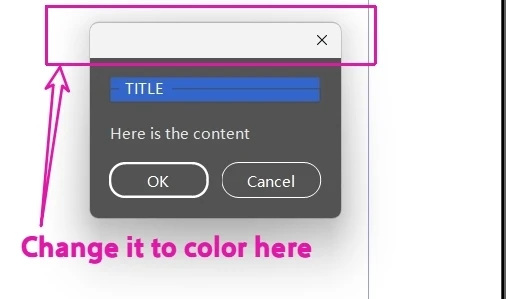
var win = new Window("dialog", undefined, undefined, { resize: false });
win.orientation = "column";
win.alignChildren = "fill";

// Self drawn color title bar
var titleBar = win.add("panel", undefined, "TITLE");
titleBar.align = "fill";
// RGB 0~1
titleBar.graphics.backgroundColor = titleBar.graphics.newBrush(titleBar.graphics.BrushType.SOLID_COLOR, [0.2, 0.4, 0.8]);

// White text
titleBar.graphics.foregroundColor = titleBar.graphics.newPen(titleBar.graphics.PenType.SOLID_COLOR, [1, 1, 1], 1);
// Content area
var content = win.add("group");
content.add("statictext", undefined, "Here is the content");

// button
var btnGroup = win.add("group");
btnGroup.alignment = "center";
btnGroup.add("button", undefined, "OK");
btnGroup.add("button", undefined, "Cancel");

win.show();
 AdChoices