



Question
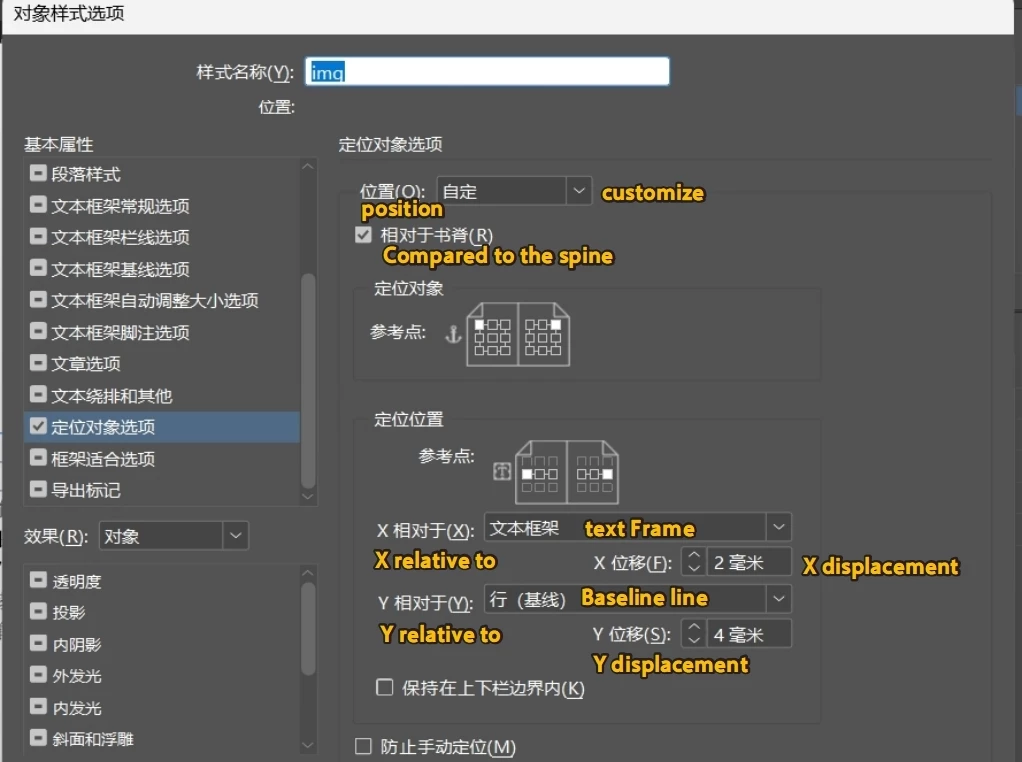
How to set the positioning object in the following figure using a script?
Hi everyone.
I want to use a script to set the object style for the following image.
I searched for some information and tried several times without success.
The annotation section seems incorrect, while the rest is correct.
reference material:
https://www.indesignjs.de/extendscriptAPI/indesign-latest/#AnchoredObjectSetting.html
Thank you very much.
imgObjStySet();
function imgObjStySet() {
var imgObjSty= app.documents[0].objectStyles.itemByName('img')
    imgObjSty.setDimensionAttributeState(DimensionAttributes.WIDTH_ATTRIBUTE, true);
    imgObjSty.transformAttributeOptions.transformAttrWidth = '52mm';
    imgObjSty.textWrapPreferences.textWrapOffset = ["2mm", "2mm", "5mm", "5mm"];

    //imgObjSty.anchoredObjectSettings = {
    //    anchorPoint: AnchorPoint.TOP_CENTER_ANCHOR,
    //    horizontalReferencePoint: AnchoredRelativeTo.TEXT_FRAME,
    //    verticalReferencePoint: VerticallyRelativeTo.LINE_BASELINE,
    //    horizontalAlignment: HorizontalAlignment.CENTER_ALIGN,
    //    verticalAlignment: VerticalAlignment.TOP_ALIGN,
    //    anchoredPosition: AnchorPosition.ANCHORED,
    //    anchorYoffset: 3,
    //}

    imgObjISty.properties = {
        //Text wrapping
        enableTextWrapAndOthers: true,
        //Position and size
        enableTransformAttributes: true,
        //Positioning object
        enableAnchoredObjectOptions: true,
    }

}
 AdChoices