Participant
October 3, 2024
Answered

How to Set TOC Text Order from Different Text Boxes in InDesign

  • October 3, 2024
  • 1 reply
  • 599 views

Hey, I have a question about the text order of TOC.

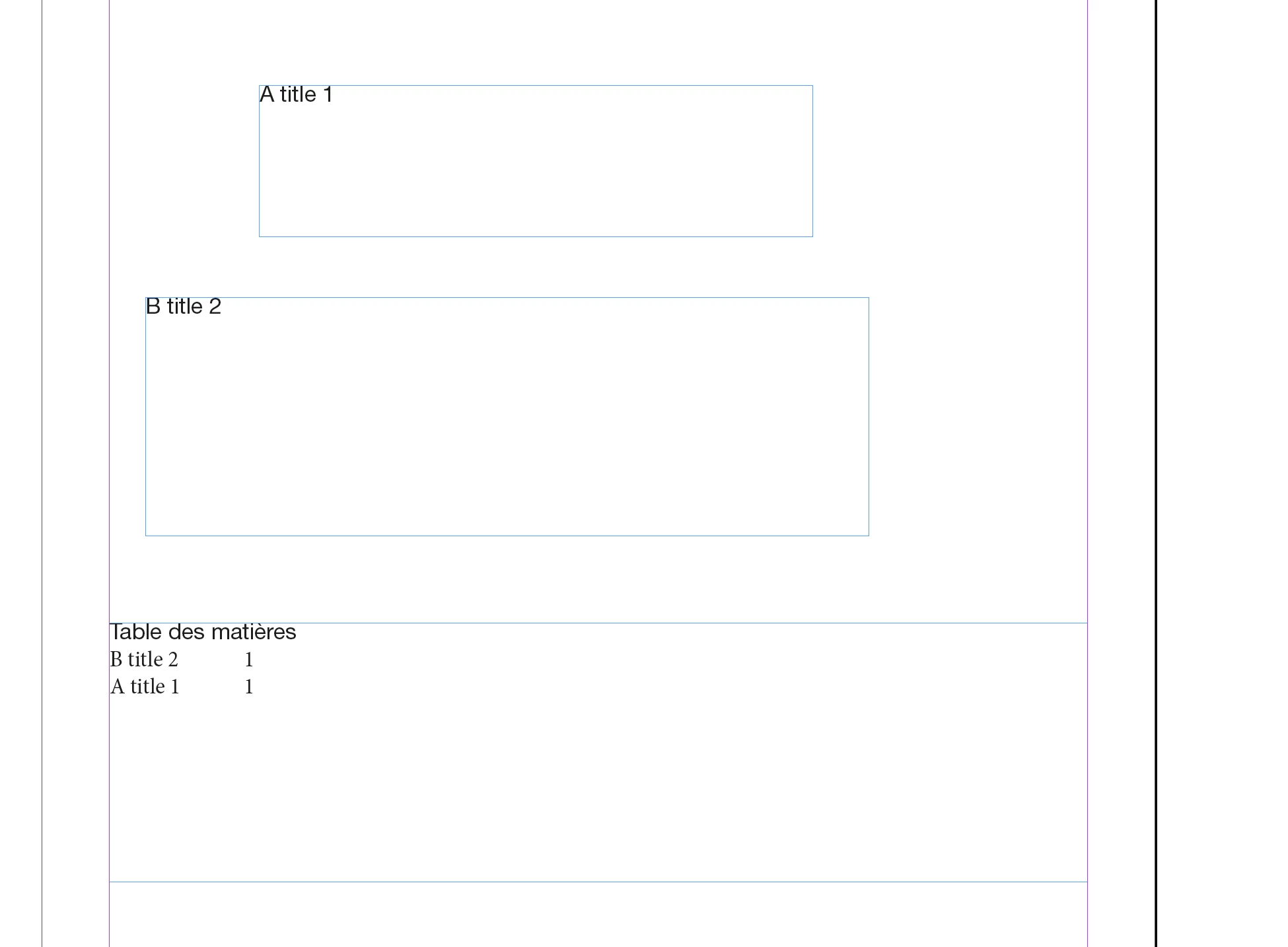
I want to add text from two text boxes, A & B, from one same page into TOC, and I have set different paragrah styles to each of them. After added the these two paragraph styles into the TOC style, with setting the paragraph style used in text box A as level 1 & that used in text box B as level 2, the TOC is generated out but with text from text box B shows above that from text box A.

Is there anything I can do to make the text from text box A show ABOVE the text from text box B in TOC?

Many thanks in advance.


<Title renamed by MOD>

 

This topic has been closed for replies.
Correct answer jmlevy

Hi @Sophie25958641r62a 

Can you post screenshots of the page showing text frames edges? I suspect that it is because the left edge of the A text frame is located further than the left edge of the B text frame.

Why don't you use a single frame?

1 reply

jmlevy
Community Expert
jmlevyCommunity ExpertCorrect answer
Community Expert
October 3, 2024

Hi @Sophie25958641r62a 

Can you post screenshots of the page showing text frames edges? I suspect that it is because the left edge of the A text frame is located further than the left edge of the B text frame.

Why don't you use a single frame?

Participant
October 4, 2024

Hey @jmlevy  You were so correct on the position of text frame, and that was exactly the reason that caused the problem I had. I moved the text A frame to make its left edge to exceed that of text B frame on left side, and it worked! Thanks so much!!!


As for the reason not using a single frame for these two text elements, I wanted these two texts to appear in different styles in its own page, and also wanted these two texts to appear in different styles in TOC page. I thought I could only achieve this by seprating them into two text frames in its own page, applying different paragraph styles to each of them, and in TOC window, applying different paragraph styles for TOC output to these two paragraph styles used on the A&B text frames. That is the only way I could think of. But I'm happy to learn if there is any other easy way to achieve what I need.


All in all, thank you for helping me out with this problem!!!

jmlevy
Community Expert
Community Expert
October 4, 2024

As the name says, paragraph styles apply to the selected paragraphs, not the frames. It means that you can have different paragraphs with different styles in the same frame.