Participating Frequently
August 20, 2012
解決済み

How to set up a Bleed and Trim area

  • August 20, 2012
  • 返信数 2.
  • 34134 ビュー

Hello,

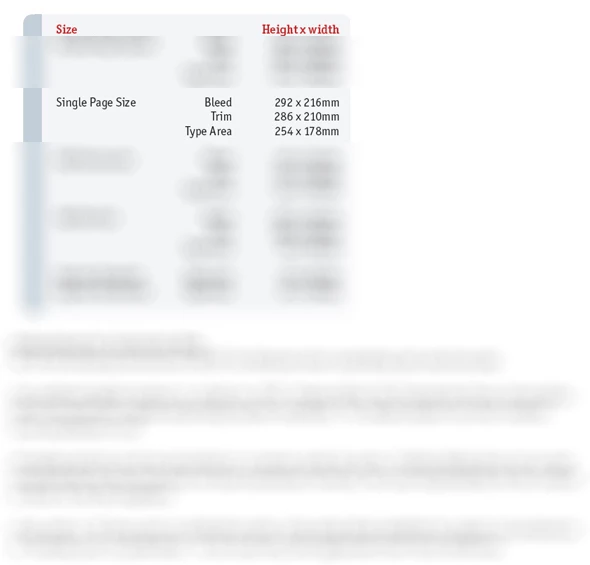
I'm very new to Indesign and still can't get my head around Bleed & Trim. Please advise me how to set up what i'm being asked here;
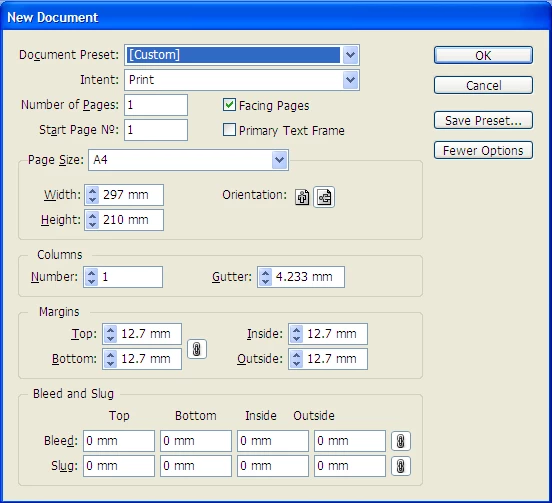
how to i input that into here;
Many thanks!

このトピックへの返信は締め切られました。
解決に役立った回答 BobLevine

The document size is 286x210 and the bleed is 3mm on all four sides. Turn off facing pages.

If you’re going to use InDesign this is going to be the least of your stumbling blocks.

I’ll give you my typical newbie advice.

First, buy Sandee Cohen’s Visual Quick Start Guide. It’s the best beginner book on the planet: http://amzn.to/ORQqtT

Secondly, check out the videos on Lynda.com. Here’s a link for a free one week trial: http://bit.ly/fcGpiI

Bob

返信数 2

Community Expert
August 20, 2012

Trim Size = width and height in the New Document dialog box.

286 x 210

The bleed is an extension of the page where anything that needs to be printed to the edge of a page needs to go into bleed area to allow safe trimming.

This is 292 x 216

292-286= 6

216-210 = 6

This is on both left and right and top and bottom - divide the results by 2

So your bleed should 3 mm on all sides.

Type area is the margins, this is where all the material that doesn't need to extend to the edge of the page needs to go. Anything outside this area may look bad when the final pages are trimmed.

Your Trim Area is 286 x 210 and the required type area is 254 x 178

That would mean you set your margins to

(286 - 254)/2 = 16 mm top and bottom

(210 - 178)/2= 16mm left and right.

But this depends on if this is a book? If it's a book it's not a good idea to have even margins - as it will look lobsided when printed and bound.

I'd talk to your printers about what Margins would be optimal for the layout - if you're not sure yourself.

JoshMancey作成者
Participating Frequently
August 20, 2012

That's brilliant - exactly what i needed!! Gonna print that out and keep it safe. Just what i've spent all day googling to find.

Its for an advert in a magazine by the way...

Peter Spier
Community Expert
Community Expert
August 20, 2012

Keep the margins even. You have no way of knowing if they'll put the ad on a left or right page.  And keep any important image details inside the type area, too, or you'll risk losing them in the binding.

BobLevine
Community Expert
BobLevineCommunity Expert解決!
Community Expert
August 20, 2012

The document size is 286x210 and the bleed is 3mm on all four sides. Turn off facing pages.

If you’re going to use InDesign this is going to be the least of your stumbling blocks.

I’ll give you my typical newbie advice.

First, buy Sandee Cohen’s Visual Quick Start Guide. It’s the best beginner book on the planet: http://amzn.to/ORQqtT

Secondly, check out the videos on Lynda.com. Here’s a link for a free one week trial: http://bit.ly/fcGpiI

Bob

JoshMancey作成者
Participating Frequently
August 20, 2012

Wonderful. Thank you. I just bought the book!

I've set thatup and it looks like this;

My only other issue is the "Type Area" they're requesting...how do i do that??

Thanks

Peter Spier
Community Expert
Community Expert
August 20, 2012

Set your margins to 16mm all around (or put guides in those postions if you want wider margins). Not sure what this page is for, but they are telling you, badly, that the types hould not extend beyond these points.