
Inspiring
April 5, 2021
Question

How to set up automatic captions

  • April 5, 2021
  • 2 replies
  • 518 views

I've been following the directions to set up my captions for my photo book. I got the directtions from this page: https://creativepro.com/automated-indesign-captions/


However, when I click on Pargraph Styles, Photo Caption, this is what I get. Or nothing happens at all when I click on Photo Captions. When I set up the Text Frame Options, I ncluded an inset of 0.125 so that the caption's not butting up against the bottom of the photo. I'm not sure where I went wrong here. What I would like my Photo Caption to include is centered text and  the inset I specified. I would also like to add it to my Library. Can someone please help me determine where I need to make changes? thank you!
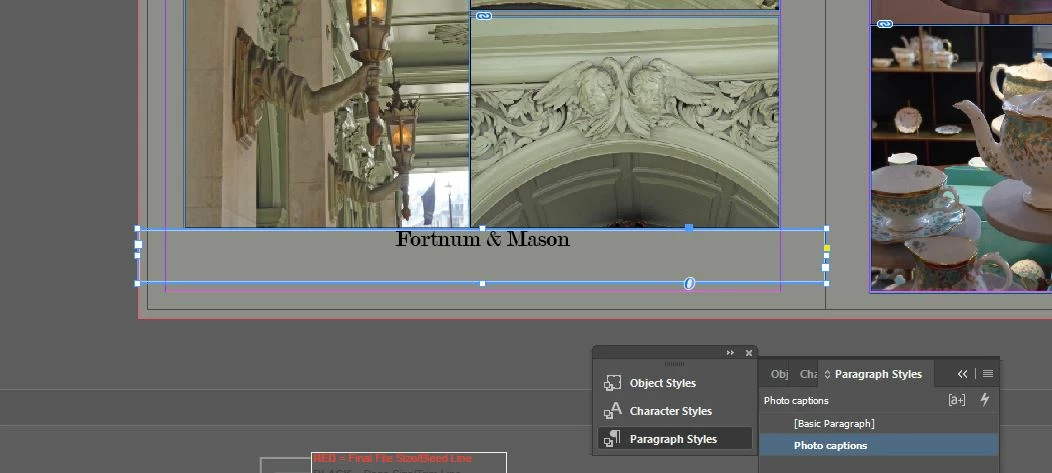
 

This topic has been closed for replies.

2 replies

Mike Witherell
Community Expert
Community Expert
April 5, 2021

With your caption frame selected, look at the Object Style panel. If the style you built isn't selected, then click it. If it also has a + sign after it, then you are being hampered with overrides countermanding your Object Style. Simply click that second button at the bottom of the Object Styles panel in order to remove the override extra attributes and leave you with the Object style as you intended it to look. 

Mike Witherell
Inspiring
April 5, 2021

OK, I did do that. There was a plus sign, so I clicked the second button. Now the text is several points smaller than I want it to be, and instead of being centered, it is now aligning on the far left.


Mike Witherell
Community Expert
Community Expert
April 5, 2021

Did you build an Object Style that captures the inset and the Paragraph Style of the caption text?

Did you make sure the Object Style is based on None?

Did you make sure the Paragraph Style is based on No Paragraph Style?

Did you apply the Object Style to the caption frames?

Did you go to Caption Options and tell it to look at Description metadata; not the Name metadata?

Mike Witherell
Inspiring
April 5, 2021

I am pretty sure I followed the directions in that article word for word. Is there a better way to go about doing this than what is in the article?


It's hard for me to answer your questions, because I did everything in order according to the article. Should I be checking your questions against my document in the order you've written them? In other words, I am foundering in the dark here. Here is another screen shot. Should I just start all over again, follow the article directions, and delete the Photo Caption I created?
I'm sorry for not being more savvy at this. I used to use photo captions when I worked with a magazine, but someone had already set the style up already (as well as for headlines, sub heads, etc.)