


Participant
August 26, 2024
Question

How to Split and Center a Text Box Across Two Pages in InDesign

  • August 26, 2024
  • 2 replies
  • 710 views

Hello everyone, quite a newbie here. 

I'm creating a timeline that is split into 3 pages. 

I'm adding text boxes for the centuries and one of them falls in between 2 pages. 

Is there a way to have the text centered like the other boxes, but split correctly in the different pages? 

The page wil be cut where the black dashed line is.

Not sure if i made myself clear, hopefully the screenshot will be helpful

Thanks!
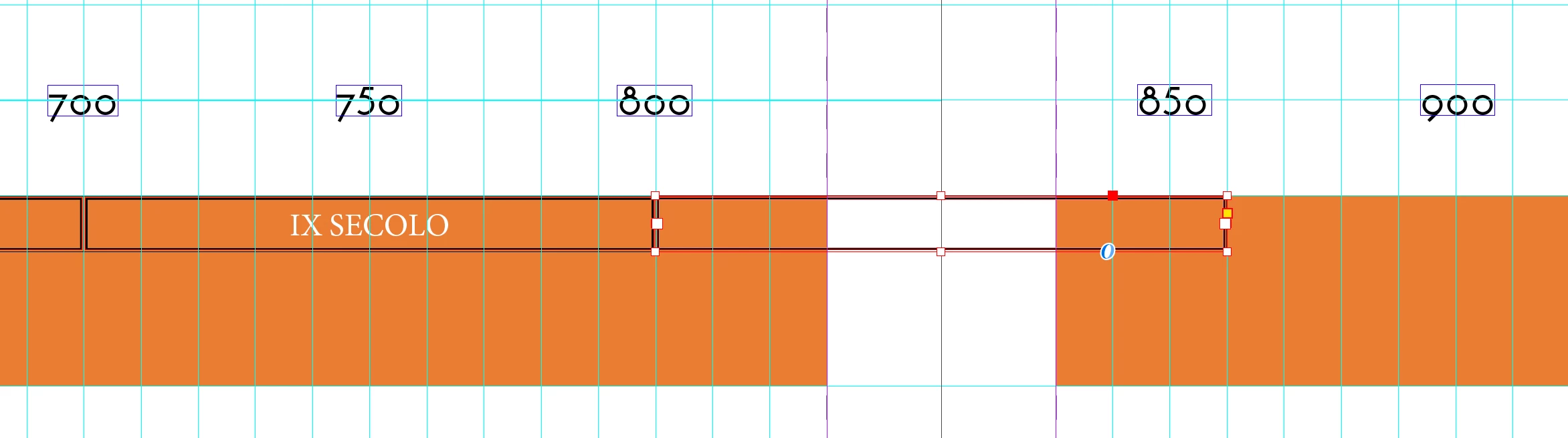


<Title renamed by MOD>

This topic has been closed for replies.

2 replies

Dave Creamer of IDEAS
Community Expert
Community Expert
August 26, 2024

I would make the center section (800-850) slight larger than the others. Then put an frame with runaound set to Both Right & Left Sides. 

It might be hard to tell, but the text still reads left-to-right. 

David Creamer: Community Expert (ACI and ACE 1995-2023)
Robert at ID-Tasker
Legend
August 26, 2024

Is the design too large to be printed in one piece? 


@diego_4819 wrote:


Is there a way to have the text centered like the other boxes, but split correctly in the different pages? 


Yes and no. 


You should rather change the width of the pages - to move and keep together this TF on either side. 


Abs your design is a bit wrong - 850 should be moved to the left - so would've to be split as well. 


And 900 should be almost in the same place as 850 is right now - should be over the right edge of the TF you want to split. 


Participant
August 26, 2024

Sadly, it is: it's made of 3 A3 sheets.

Robert at ID-Tasker
Legend
August 26, 2024
quote

Sadly, it is: it's made of 3 A3 sheets.


By @diego_4819


Then you probably will need to split it into 4x A3 pages.


Don't cut your TFs in the middle of the century... but then you'll still have to have full 100s cut in the middle anyway...


How it will be "processed" after printing?