
Inspiring
June 28, 2018
Answered

How to stop InDesign generating a PDF when copying?

  • June 28, 2018
  • 2 replies
  • 1635 views

Hi There,

I posted about this a while ago but nobody understood what I was talking about. If you've never seen this, please don't clutter the thread with 'I've never seen this' comments.

I often work on outdoor files (mall posters, cinema posters, buses, billboards etc) and have noticed over the last 5 years (at least) that documents over a certain physical size and/or file size, force InDesign to generate a PDF every time you copy objects (see attached).
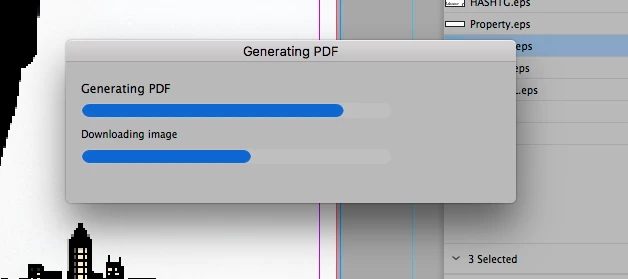
This behaviour is time-consuming and mind-numbing sorry, so hopefully there's a way of forcing InDesign to copy objects/links instead of generating a PDF every time.

COMPUTER SETUP:

- 2013 Mac Pro, 64GB Ram

- OSX 10.12.6 (behaviour was also present in 10.11, 10.10 , 10.9)

- InDesign CC2018 (behaviour was also present in CC2017, CC2016 etc going back years)

- Trashing InDesign prefs makes no difference

- Have also reinstalled (erase and install from scratch) my machine a couple of times since noticing this behaviour

TO REPRODUCE:

NOTE: I don't know what the threshold is but try the following...

- Create 3 or 4 eps files of text converted to paths (like a movie billing block, release date, movie title etc)

- Create a photoshop file that's 720mm x 1000mm (30" x 40") at 300dpi

- Paste an image and enlarge so there's full pixel coverage (so it isn't white)

- Export the photoshop file to a JPEG or TIFF

- Create an InDesign file to 720mm x 1000mm (30" x 40")

- Import the image and cover the page with 10mm bleed

- Import the eps files and position over the image

- Select all and hit CMD + C to copy

- If you don't see the 'Generating PDF' window, try having several documents open at once

Does anyone else see this and does anyone know how to turn this behaviour off?

Cheers

Ben
    This topic has been closed for replies.
    Correct answer cmscss

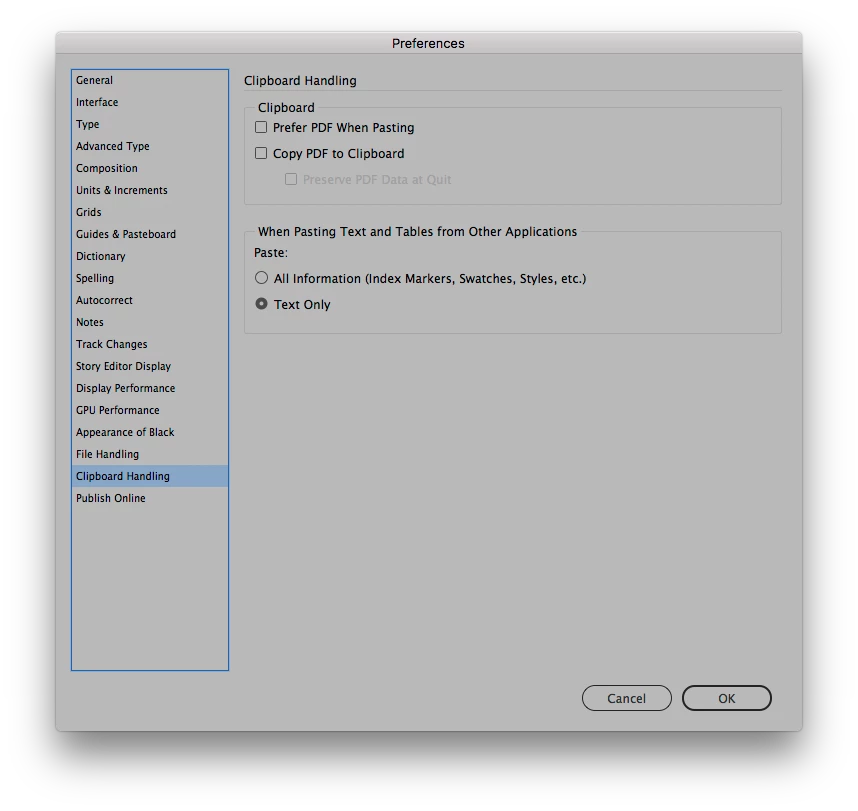
    There's another preference 'Copy PDF to Clipboard' which I wrongly assumed was for copying PDFs (not converting the clipboard to a PDF).

    Turning this off has given me instant copy/paste - incase others run into this, here's a screenshot of the preferences that turn off this behaviour.

    Life changing!

    Cheers

    2 replies

    Jongware
    Community Expert
    Community Expert
    June 28, 2018

    You mention "EPS" a few times. Scratch that, you mention it a lot. Am I right in guessing that your entire workflow revolves around EPS images?

    An EPS is read and interpeted into InDesign's native preview format by InDesign itself, just to create "something" that you can see on the screen. This is done by creating a PDF o  the fly. You are throwing quite large numbers around, of both vector images ("text converted to outlines") and bitmap files. And all of that ... through EPS as a medium.

    Do your woes magically disappear if you stop using EPS, and use native AI and PDFs for vector files and native TIFF, PSDs, or PDFs for bitmap images?

    Avoid EPS, with all of its problems. Yes: technically you are correct if you counter that "InDesign officially supports it and so it should do just fine". But to me it sounds you are pushing the boundaries of what it was meant for.

    Part of your expected response "don't comment if you never seen this" may be because everybody else avoids EPSes like the plague.

    cmscssAuthor
    Inspiring
    June 28, 2018

    Thanks for the replies, 'Prefer PDF when Pasting' is off.

    The eps files come from the movie studios (I prefer .ai as well) but will now test the theories regarding file types and report back.

    Cheers

    cmscssAuthorCorrect answer
    Inspiring
    June 28, 2018

    There's another preference 'Copy PDF to Clipboard' which I wrongly assumed was for copying PDFs (not converting the clipboard to a PDF).

    Turning this off has given me instant copy/paste - incase others run into this, here's a screenshot of the preferences that turn off this behaviour.

    Life changing!

    Cheers

    TᴀW
    Legend
    June 28, 2018

    Did you try unchecking the option under Preferences > Clipboard Handling > Prefer PDF when Pasting?

    Visit www.id-extras.com for powerful InDesign scripts that save hours of work — automation, batch tools, and workflow boosters for serious designers.