
Participant
November 29, 2023
Question

How to stop table row from jumping to next page?

  • November 29, 2023
  • 2 replies
  • 627 views

Hi, 


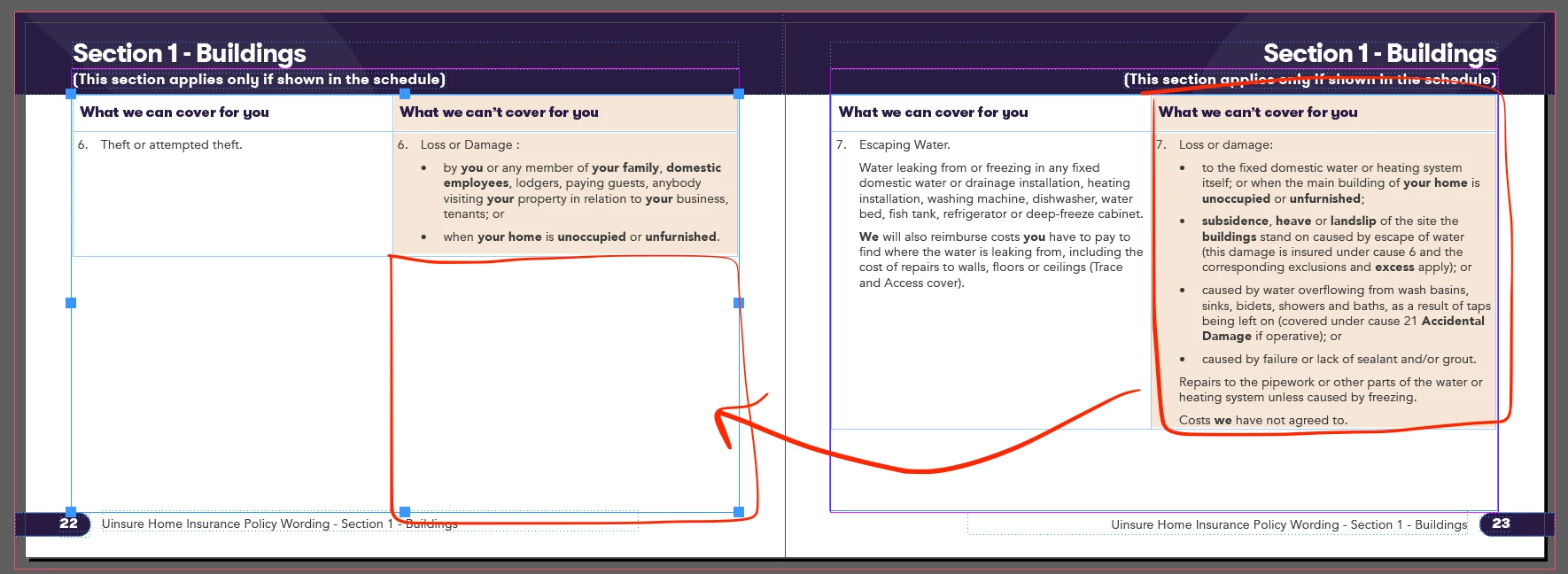
I'm creating a large table in InDesign, some of the rows have more info than others. When the copy is longer than the bounding box / text box, it is automatically jumping to the next page. This leaves a large amount of white space on the previous page - I'm trying to create this doc with as little pages as possible for printing costs. So it would be great if the table used the whole space and automatically ran left over text into the next table instead of shifting the entire row. 


I've checked the row and column heights and the keep settings. 


Any ideas would be much appreciated! 
This topic has been closed for replies.

2 replies

Peter Kahrel
Community Expert
Community Expert
November 29, 2023

In other words, you can't split table rows/cells. Join the crowd in this feature request:


https://indesign.uservoice.com/forums/601021-adobe-indesign-feature-requests/suggestions/33854788-option-to-split-table-rows-across-pages


It's status is 'in the backlog', which probably means 'in permafrost', but do vote anyway.

Mike Witherell
Community Expert
Community Expert
November 29, 2023

Conceptually, you cannot have a row be in two places. If so, it would be two rows.

But you can edit your text to be brief enough to fit the page.

You might also consider making edits to the paragraph style in the table cell so that the text is smaller or the leading tighter.

You might further consider not using a table at all. Make the same appearance only by using paragraph styles.

Mike Witherell