Known Participant
November 27, 2024
Question

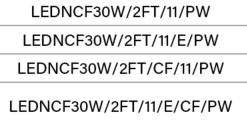
How to stop this pyramid effect on text in indesign?

  • November 27, 2024
  • 2 replies
  • 323 views

This topic has been closed for replies.

2 replies

Robert at ID-Tasker
Legend
November 27, 2024

@James3669094303ct


https://helpx.adobe.com/uk/indesign/using/aligning-text.html 


Align Left, Align Center, Align Right, Left Justify, Center Justify, Right Justify, Full Justify, Align Towards Spine, Align Away From Spine.


Willi Adelberger
Community Expert
Community Expert
November 27, 2024

This is center alignment. The pyramid comes due to the text you have written.

You could use a different alignment or write a different text.

Known Participant
November 27, 2024

What do you mean by different alignment?

Inspiring
November 27, 2024

Your text is writing from the centre outwards. Try justified or left justified text - select the text frame the Ctrl+Shift+L , or Ctrl+Shift+C to centre again.