


Question
How to Stretch and Compress an Image at Specific Angles in InDesign
I always try to include a graphic illustrating my issue, so...
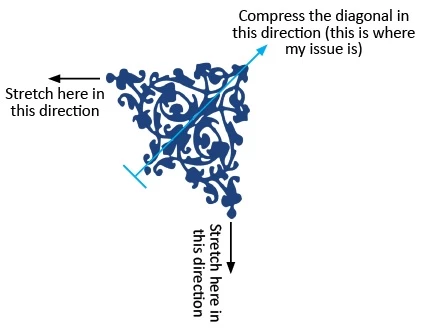
My goal is to stretch and compress the same image where indicated.
The stretch parts are easy:
- Highlight the image.
- Go to Properties.
- With the proportional Horizontal and Vertical percentages linked, adjust the percentage of either vector as necessary.
- Unclick image.
- Save.
Now, the issue is that I also want to compress the image where indicated. The area where I want to use the image has lots of space on the horizontal and vertical edges, but at the 45° angle, not so much space.
Another way of putting it: Stretch the ends, pinch the center.
Can this be done in ID? If so, how?
<Title renamed by MOD>
 AdChoices