
Inspiring
February 22, 2022
Answered

How to tell what figure styles an Adobe font has?

  • February 22, 2022
  • 2 replies
  • 457 views

Hi everyone, 


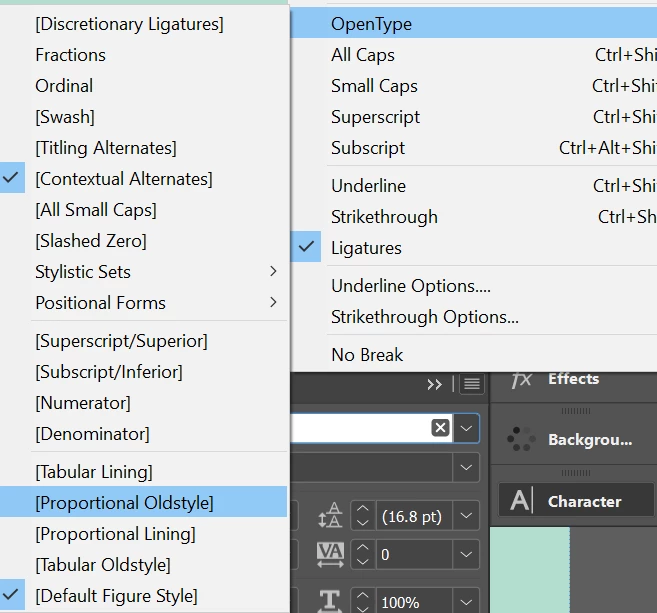
Is there a way to tell what figure styles are available to a certain font on fonts.adobe.com without activating the font? Also, I had question about the figure styles in InDesign. I assume the parenthesis around the style means it is not available for that particular font? This is Basic Sans and nothing happens when I switch between the different styles. If I change the font to Arial then it takes the parenthesis off and the styles do actually effect the font. I was trying to use Tabular Lining with Basic Sans but I'm thinking its not possible.
This topic has been closed for replies.
Correct answer Eugene Tyson

Yes, that's correct, when there's Parenthesis around it it simply is not available (why it's not grayed out I don't know).


I don't see a way to filter the Adobe Fonts or search in the way you want.

You could ask here and request it 

https://adobefonts.uservoice.com/forums/940222-adobe-fonts-feature-requests-and-feedback


2 replies

Community Expert
February 23, 2022

Hi Adam,

also see into this free script by Roland Dreger that is showing all available OpenType features of selected text. You can enable or disable features easily.


openTypeFeatures.jsx is now available in version 2.1:

https://github.com/RolandDreger/open-type-features#script-usage


Some videos showing basic functionality:


OpenType Features Dialog
by Roland Dreger showing the version 1 feature set of the script
https://vimeo.com/606686469


OpenType Features Dialog V2.0
by Roland Dreger
https://vimeo.com/666012220


OpenType Features Dialog V2.0 (Part 2)
by Roland Dreger
https://vimeo.com/667300122


Note: Depending on the applied paragraph composer of the typed text there may be different OpenType features available for an applied font. E.g. the Japanese Paragraph Composer vs the Adobe Paragraph Composer.


Regards,
Uwe Laubender

( ACP )

Eugene TysonCommunity ExpertCorrect answer
Community Expert
February 22, 2022

Yes, that's correct, when there's Parenthesis around it it simply is not available (why it's not grayed out I don't know).


I don't see a way to filter the Adobe Fonts or search in the way you want.

You could ask here and request it 

https://adobefonts.uservoice.com/forums/940222-adobe-fonts-feature-requests-and-feedback


adamh88Author
Inspiring
February 22, 2022

Thanks! And yeah why its not just grayed out was going to be my next question haha