
Participating Frequently
Aug 3, 2020 3:29 PM UTC
Answered

How to Untag the Elements without removing processing Instruction
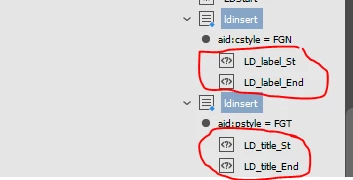
In javascript, I want to untag the selected elements(Element Name: ldinsert) without removing processing instruction(marked red color). Its possible while untagging manually but doing in ExtendScript toolKit i can't why???

Code used for untagging elements.

if(myElements[i].markupTag.name=="ldinsert")
{
  myElements[i].untag();
}

 

This topic is closed to new replies. Start a new post to keep the conversation going.
Sunil Yadav
Sunil YadavCorrect answer
Legend
Aug 5, 2020 10:09 AM UTC

Unfortunately from code xml instruction also will be removed.

To tackle this you can try untagging like this:

///////////////////////////////////////////////////////////////////////////////////

if(myElements[i].markupTag.name=="ldinsert"){
    var myNode = myElements[i];
    for(var p = 0; p < myNode.xmlInstructions.length; p){
        myNode.xmlInstructions[p].move(LocationOptions.BEFORE, myNode);
        }
    myNode.untag();
    }

///////////////////////////////////////////////////////////////////////////////////

Best

Sunil

5 replies

Participant
Jan 4, 2021 3:45 AM UTC

Unfortunately 

Translate
Sunil Yadav
Sunil YadavCorrect answer
Legend
Aug 5, 2020 10:09 AM UTC

Unfortunately from code xml instruction also will be removed.

To tackle this you can try untagging like this:

///////////////////////////////////////////////////////////////////////////////////

if(myElements[i].markupTag.name=="ldinsert"){
    var myNode = myElements[i];
    for(var p = 0; p < myNode.xmlInstructions.length; p){
        myNode.xmlInstructions[p].move(LocationOptions.BEFORE, myNode);
        }
    myNode.untag();
    }

///////////////////////////////////////////////////////////////////////////////////

Best

Sunil

Translate
Participant
Oct 19, 2022 12:08 PM UTC

hi bro 

 i have a dout in un tag single xml element plz provide source code for this......

kindly send to  my mail.id suriyag1210@gmail.com.

Translate
brian_p_dts
Community Expert
Community Expert
Aug 3, 2020 4:04 PM UTC

Not sure if this would help, but you could try just removing the tag. 


https://www.indesignjs.de/extendscriptAPI/indesign-latest/#XMLTag.html


if(myElements[i].markupTag.name=="ldinsert")
{
  myElements[i].markupTag.remove();
}


Translate
Participating Frequently
Aug 4, 2020 6:15 AM UTC

Thanks for your reply.

Remove() function is contains replacewith parameter(its required, not optional) but i want to untag element without removing processing instruction and also content inside the untagged elements.

Translate