
Inspiring
May 5, 2023
Answered

How to update InDesign (TOC) while the document is in the background and without displaying anything

  • May 5, 2023
  • 3 replies
  • 2837 views

I need some help troubleshooting my script.


The below script is part of a larger script that creates multiple files and adds them to a book.

Once all of the files are in the book, I need to update the Table of Contents (TOC).


Part of my goal is to not have anything display while this script is running. (Still tring to figure out how to supress the book panel...) TO achieve that, I have opened the file, with the TOC I need to update, in the background. Unfortunately, when the script reaches "story.textContainers[0].select()" it fails, telling me me there is no document window open:
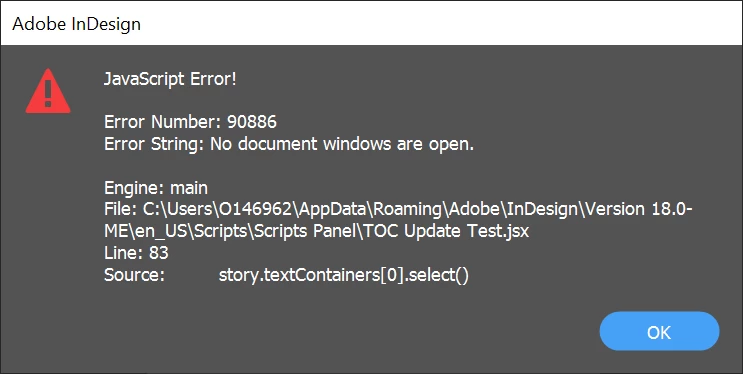
 

This is intentional, since I don't want any document windows open, but it is clearly causing a problem for the script. How do I get teh script to select the necessary text frame and update teh TOC while the document is in the background? 


//Update TOC
var fob1_path = bookFolder + "/1" + fileNameNodes + "FOB.indd";
var fobFile1 = app.open(File(fob1_path), false);

function updateTOC(){
    var stories = app.documents[0].stories;
    for(var i=0; i < stories.length; i++) {
        var story = stories[i]
        if(story.storyType != StoryTypes.TOC_STORY)
            continue;
        story.textContainers[0].select()
        app.menuActions.item("$ID/UpdateTableOfContentsCmd").invoke();
    }
};

updateTOC();

fobFile1.save();
fobFile1.close();


<Title renamed by moderator>
This topic has been closed for replies.
Correct answer Ben Ross - KP

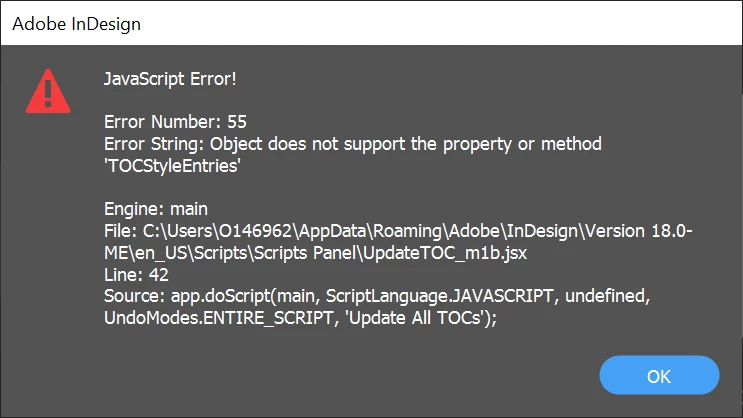
@m1b When I run this updated version, I get the following error:


@m1b I did get the following to work:

var fobFile1 = app.open(File("ADD FILEPATH"));

fobFileName = fobFile1.fullName

fobFile1.close()

fobFile = app.open(fobFileName, false)

function updateTOC(){
    var doc = app.documents.item(0);
    var docTOC = doc.tocStyles.itemByName('PD - TOC - 3');
    myBook = app.activeBook;
    doc.createTOC(docTOC, true, myBook);
};

updateTOC();

fobFile.close()

Now I just have to figure out how to manage books in the background! 😅

3 replies

Peter Kahrel
Community Expert
Community Expert
May 6, 2023

@Ben Ross - KP -- In general you should avoid trying to do things via InDesign's menus when there are script functions available. Script functions are language-independent and are more robust.


Inspiring
May 8, 2023

Thank you @m1b and @Peter Kahrel@Peter Kahrel I am brand new to ID scripting and would welcome any additional guidance you can offer. I am still trying to figure out what script functions are available to me. I have downloaded the SDK and have found https://www.indesignjs.de/extendscriptAPI/indesign-latest/#Document.html to be a really useful reference, but it is not always easy to find what I need.

Peter Kahrel
Community Expert
Community Expert
May 8, 2023

Forget about the SDK, that's no good to you.


it is not always easy to find what I need


That's something that battle-hardened veterans, too, continue to struggle with occasionally. Don't give up! Learning to script InDesign requires bloody-minded stubborness.

m1b
Community Expert
Community Expert
May 6, 2023

Hi @Ben Ross - KP, I think this will give you a way forward:


/**
 * Update all TOCs in document.
 * @discussion https://community.adobe.com/t5/indesign-discussions/how-to-update-indesign-toc-while-the-document-is-in-the-background-and-without-displaying-anything/m-p/13773925
 */
function main() {

    var doc = app.documents[0],
        docTOCStyles = doc.tocStyles;

    if (docTOCStyles.length == 0) {
        alert('Document ' + document.name + ' has no TOC Styles to update.');
        return;
    }

    for (var i = 0; i < docTOCStyles.length; i++) {

        // TOC Style must have at least one entry
        // but the default style, by default, does not
        if (docTOCStyles[i].tocStyleEntries.length > 0)
        doc.createTOC(docTOCStyles[i], true);

    }

} // end main

app.doScript(main, ScriptLanguage.JAVASCRIPT, undefined, UndoModes.ENTIRE_SCRIPT, 'Update All TOCs');


EDIT 2023-05-09: based on an issue reported by @25831189rjun, added a check to see that the TOC Style does have at least one TOCStyleEntry (which the default TOC Style won't have by default).


Calling the createTOC method of Document with an existing TOCStyle and replacing argument "true" will essentially update any TOC Stories in that TOCStyle. And because it doesn't use any UI it should work in hidden document.

- Mark

Inspiring
May 8, 2023

Thanks @m1b!, I'll give this a try. Though, I have found that activeDocument does not like to acknowledge background docs, I may be able to get around that using documents.item(0).

m1b
Community Expert
Community Expert
May 8, 2023

@m1b I am getting the follwoing error when I run that script:

BTW, my first script worked as long as I didn't put the document in the background. SO I know the TOC element is there and can be updated.


Hi @Ben Ross - KP, for testing, can you try running the following script? It just sets up a better test. At least it will show you which TOCStyle is giving the error, hopefully.


/**
 * Update all TOCs in invisible document.
 * @discussion https://community.adobe.com/t5/indesign-discussions/how-to-update-indesign-toc-while-the-document-is-in-the-background-and-without-displaying-anything/m-p/13773925
 */
function main() {

    // to set up the test we'll start with
    // the active, visible, document
    var doc = app.activeDocument,
        docFile = doc.fullName;

    // and close it
    doc.close();

    // then open it, invisible
    doc = app.open(docFile, false);

    var docTOCStyles = doc.tocStyles;
    if (docTOCStyles.length == 0) {
        alert('Document ' + document.name + ' has no TOC Styles to update.');
        return;
    }

    // update each TOC Style
    for (var i = 0; i < docTOCStyles.length; i++) {

        // TOC Style must have at least one entry
        // but the default style, by default, does not
        if (docTOCStyles[i].tocStyleEntries.length > 0) {
            doc.createTOC(docTOCStyles[i], true);
        }

    }

    // now to check if updating worked:
    // close and save, and then open visibly
    doc.close(SaveOptions.YES);
    app.open(docFile, true);

} // end main

app.doScript(main, ScriptLanguage.JAVASCRIPT, undefined, UndoModes.ENTIRE_SCRIPT, 'Update All TOCs');


EDIT 2023-05-09: based on an issue reported by @Ben Ross - KP, added a check to see that the TOC Style does have at least one TOCStyleEntry (which the default TOC Style won't have by default).


You are right to use app.documents.item(0) when there is no window for a document—an invisble document is never the activeDocument so you can't reference it that way. You can also use app.documents.itemByName or some other method to get it. In the test script I am deliberately starting with the active document, to be sure of which document you are testing with.


As to the actual error you see, I couldn't reproduce it—it seems to imply that one of your TOCStyles doesn't have any entries. When I tried to create a TOCStyle with no entries it wouldn't let me:

Can you try the test with a different document with a different TOC Style? See if it is something to do with the particular TOC Style in that one document?

- Mark

Inspiring
May 5, 2023

I did find this stack overflow article from nearly 11 years ago: 

select / cut / pasteInto when window not visible


But I am hoping there is some way around this.