Inspiring
February 6, 2024
Answered

How to update Table of Contents when you have more than one TOC in the document?

  • February 6, 2024
  • 1 reply
  • 173 views

I have a Table of Contents and a List of Figures. They are both in separate text boxes on separate pages. I want to update the Table of Contents only. 


When I go to Layout>Update Table of Contents, my Table of Contents is replaced by my List of Figures. How do I get InDesign to see my Table of Contents and List of Figures separately, so I can update them indepenent of one another? 
This topic has been closed for replies.
Correct answer Eugene Tyson

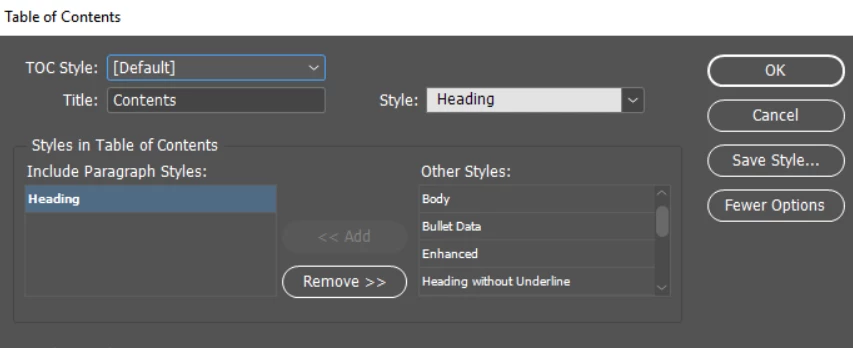
You need to create 2 Table of Contents


In the Table of Contents 

You can see TOC Style: it's set to Default

You can Save Style... it's on the right


Set up 2 Table Of Contents and save them


Then when you're generating your TOC select whichever one is appropriate


1 reply

Eugene TysonCommunity ExpertCorrect answer
Community Expert
February 7, 2024

You need to create 2 Table of Contents


In the Table of Contents 

You can see TOC Style: it's set to Default

You can Save Style... it's on the right


Set up 2 Table Of Contents and save them


Then when you're generating your TOC select whichever one is appropriate