
Inspiring
August 29, 2022
Answered

How to use GREP to make negative figures in red, INCLUDING past the decimal point?

  • August 29, 2022
  • 2 replies
  • 734 views

Hello one and all! Im currently using a GREP style to change all my negative figures automatically into it's red colored character style, however it will not include the numebers that appear after the deeecimal point. Does anyone have a solution for this please?
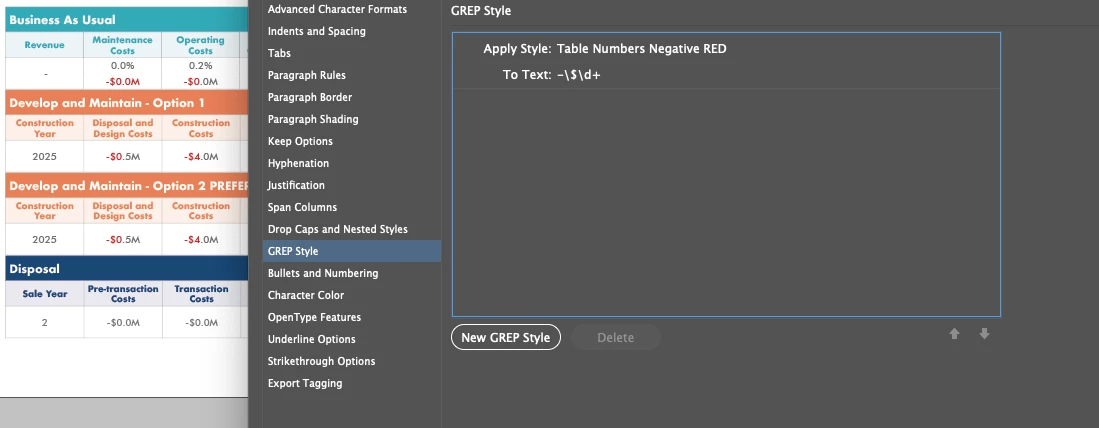
 

Im currently using -\$\d+


Cheers!

This topic has been closed for replies.
Correct answer Peter Spier

I would use -\$?\d+\.?\d*

It should find negative numbers with or without the $ and well as with or without  a decimal.

2 replies

Peter Spier
Community Expert
Peter SpierCommunity ExpertCorrect answer
Community Expert
August 29, 2022

I would use -\$?\d+\.?\d*

It should find negative numbers with or without the $ and well as with or without  a decimal.

Inspiring
August 31, 2022

Oh my gosh, so close! Thanks for that. The only thing I need it to include now is the letter after the number, such as the 'M' to represent the Million. Please see here:


Scott Falkner
Community Expert
Community Expert
August 29, 2022

Try this expression: 

-\d+(\.|)\d+