aa54655517
Participant
March 15, 2017
Answered

How to use JavaScript or VBScript to send some keystrokes to InDesign to activate (select) a specific open document?

  • March 15, 2017
  • 1 reply
  • 1016 views

Please see the "Image 1" as below, it shows that from the "Windows" drop-down menu, 5 indd documents ("Document-1.indd", "Document-2.indd", "Document-3.indd", "Document-4.indd", "Document-5.indd") are open.

How to use JavaScript or VBScript to send some keystrokes to InDesign to activate (select) "Document-1.indd"? When some one sends keystrokes by manual, the keystrokes sequence is "Alt", "W", "1". But please include this keystrokes sending into the scripts by JavaScript or VBScript.

Note:

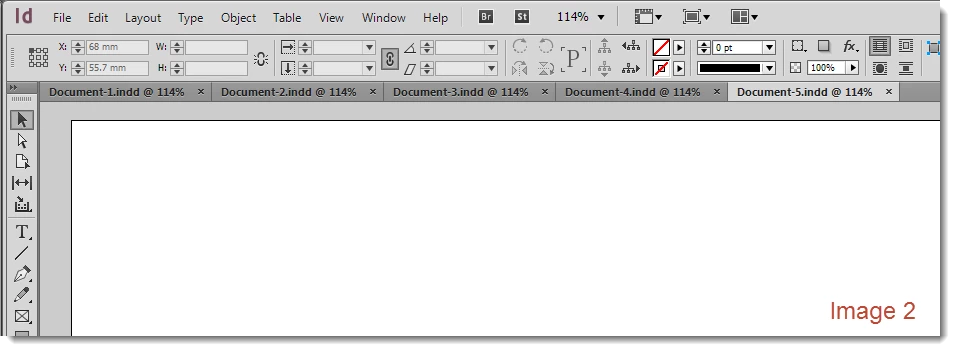
Please start the script base on the InDesign status as "Image 2". In this status, "Document-1.indd" is not activated, and no drop-down menu is popping out.

Thanks.
TMP_DON

This topic has been closed for replies.
Correct answer Laubender

Hi again,

for my Mac OSX InDesign I finally come up with this solution:

var menuItems =

    app.menus.item("$ID/Main").

    submenus.item("$ID/&Window").

    menuItems.everyItem().getElements();

for(var n=0;n<menuItems.length;n++)

{

    if(menuItems.name.match(/@ \d+ %$/))

    {

        menuItems.associatedMenuAction.invoke();

        break;

    }

};

It depends on the names of the menuItems under Window where only opend InDesign documents are listed with a pattern like a percentage sign at the end of the item. Hope, that helps…

Tested with InDesign CS6 8.1.0 on OSX 10.6.8.

Maybe an alphabetically search through the document names would do as well, but then we would have to factor in some things:
1. Substrings InDesign is adding like the * for changed documents.
2. Alphabetical order for locale versions that would be hard to grasp. Sorting order for a German InDesign could be different from a Turkish version.

3. Names that will not show up, because the documents were opened by scripting without a visible layout window.

Regards,
Uwe

1 reply

Community Expert
March 15, 2017

Hi,

you would not need a menu action or a keystroke sequence to access the first listed item of the opened documents.

It just requires a sort action after document id numbers. That sequence you are seeing is building on the timely order a document is opened.

Tabs could be moved around or windows could be made free floating, the order in the menu will not change.

And since you after the first one listed, something like this should work:

var ids = app.documents.everyItem().id.sort(function(a,b){return a-b });

for(var n=0;n<ids.length;n++)

{

    if(app.documents.itemByID(ids).layoutWindows.length > 0)

    {

        app.activeDocument = app.documents.itemByID(ids);

        break;

    }

};

Loop and if statement seems to be necessary…

See also my posts in your other thread here that is asking a similar question :

How to use script to activate the document in the first place?

Regards,
Uwe

Community Expert
March 15, 2017

Hm. I'm wrong on this…

Sigh.

It's the alphabetic sort order of open document names.

So do an alphabetically sort with:

app.documents.everyItem().name

Sorry,

Uwe

LaubenderCommunity ExpertCorrect answer
Community Expert
March 15, 2017

Hi again,

for my Mac OSX InDesign I finally come up with this solution:

var menuItems =

    app.menus.item("$ID/Main").

    submenus.item("$ID/&Window").

    menuItems.everyItem().getElements();

for(var n=0;n<menuItems.length;n++)

{

    if(menuItems.name.match(/@ \d+ %$/))

    {

        menuItems.associatedMenuAction.invoke();

        break;

    }

};

It depends on the names of the menuItems under Window where only opend InDesign documents are listed with a pattern like a percentage sign at the end of the item. Hope, that helps…

Tested with InDesign CS6 8.1.0 on OSX 10.6.8.

Maybe an alphabetically search through the document names would do as well, but then we would have to factor in some things:
1. Substrings InDesign is adding like the * for changed documents.
2. Alphabetical order for locale versions that would be hard to grasp. Sorting order for a German InDesign could be different from a Turkish version.

3. Names that will not show up, because the documents were opened by scripting without a visible layout window.

Regards,
Uwe