Participant
December 2, 2018
Answered

How use "place and link" to copy a piece of text across a document without keeping the original paragraph style

  • December 2, 2018
  • 5 replies
  • 785 views

Hey folks.  I have what I thought would be a very simple task:

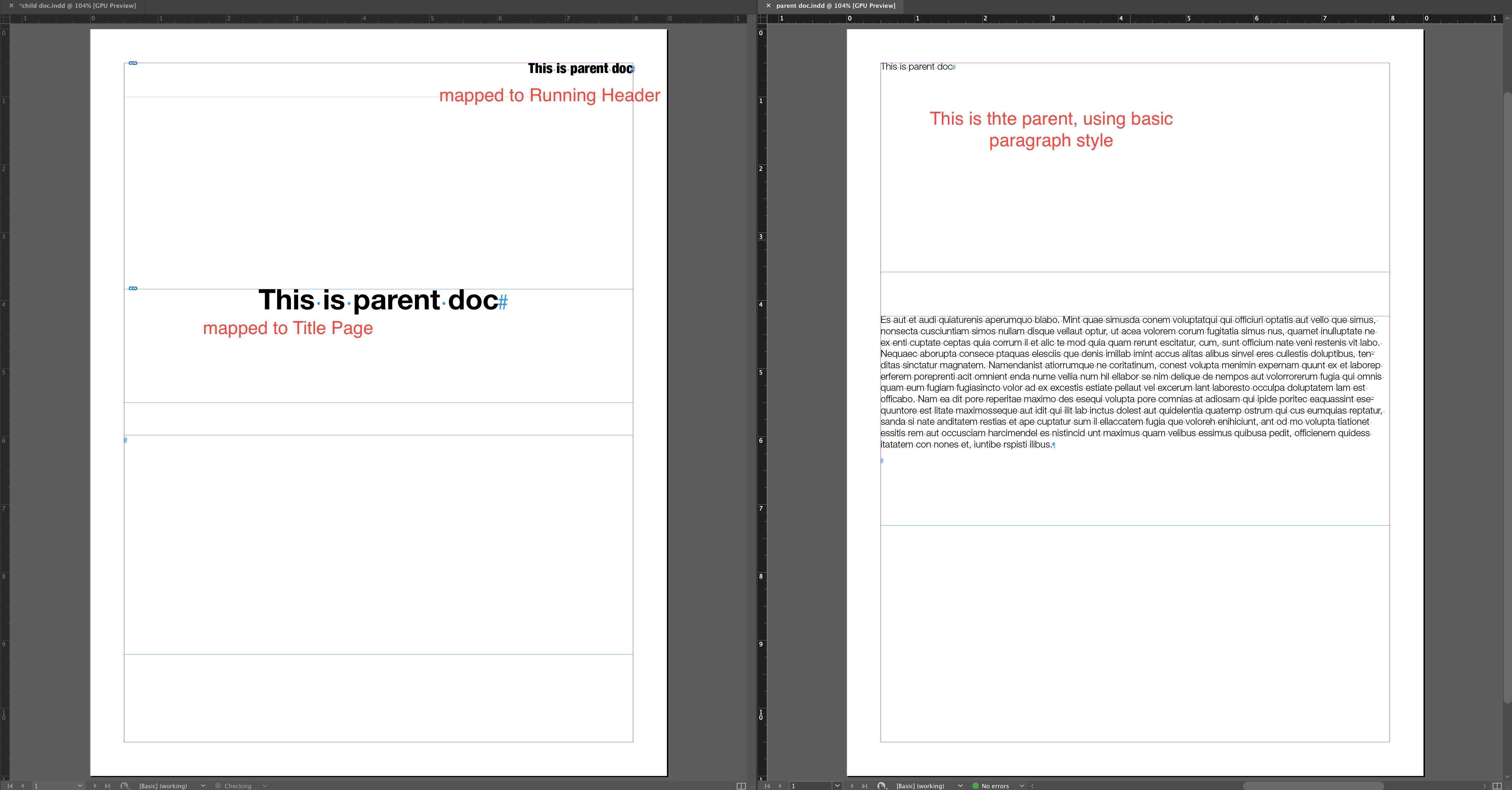
I'm using the Place and Link command and conveyor tool to copy text from a parent document into multiple locations in a child document.  The problem is that I don't want each instance of this text to be the same style in the child document.  Is there a way to "Place and Link" only the text without the formatting?

For example  I want to write the name of a client project once in the parent document and then have that same text appear in the child document on the cover page in 45pt, yellow font, and then again on the headers of each page in 10pt, black font.  I cannot figure out how to do this.

Please see this video of my problem for clarification on what I'm trying to accomplish.

Play Screen Capture

This topic has been closed for replies.
Correct answer dave c courtemanche

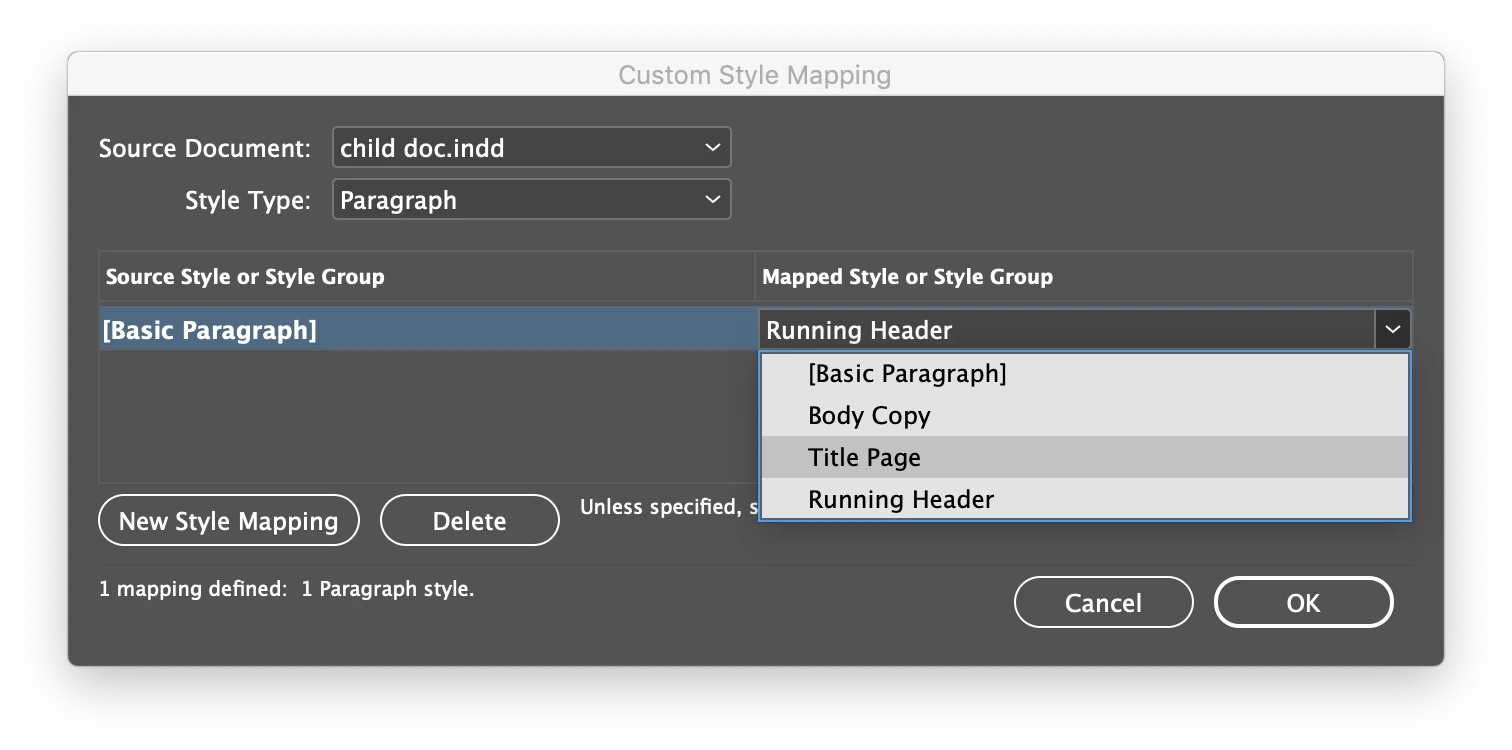
I've never used the content collector tool, but was just playing around with it. Have you tried mapping the styles? Create the various styles for your child doc and map to them.

5 replies

Zaid Al Hilali
Community Expert
Community Expert
December 10, 2018

Have you tried fiddling with "Link Options" which you can select in the Links Panel fly-out menu?

At the bottom of the Link Options dialogue window, there is the "Define Custom Style Mapping" referred to by ​@dave c courtemanche

This dialogue window applies to all links whether they are text or any other format so be careful of what you change here.

Srishti_Bali
Legend
December 6, 2018

Hi Brenton,

I would like to know if the steps suggested above worked for you, or the issue still persists.

Kindly update the discussion if you need further assistance with it.

Thanks,

Srishti

Inspiring
December 3, 2018

The advantage of using the conveyor is that it includes styling. To drop styling there are a number of options. One would be a simple script that copies the contents of a designated text frame  in the parent document to designated frames of the child document. Below is a simplified script (in AppleScript) that can get you started. For this example the text frames are both named "SharedText". The script also assumes that you only have one text frame on the master page(s). If more than one text frame per page, you will also need to name the header frames for identity. (You can name items using the layers panel.) The script also assumes the child document has a paragraph style "Head Style" for the 45pt yellow text and one named "Folio" for the headers. (You can change names as needed but make sure they are the same in the script as in the document.)  Copy the following to Script Editor and run with both documents open. Not only does the script copy the text (assuming its paragraph 1 of the named text frame), it styles it.

tell application "Adobe InDesign CC 2018"

set parentDoc to document "ParentDocument.indd"

set childDoc to document "ChildDocument.indd"

set headStyle to paragraph style "Head Style" of childDoc

set sText to paragraph 1 of text frame "SharedText" of parentDoc

tell text frame "SharedText" of childDoc

set contents to sText

set applied paragraph style of paragraph 1 to "Head Style"

end tell

tell master spread 1 of childDoc

set theCount to count of pages

repeat with i from 1 to theCount

set contents of text frame 1 of page i to sText

set applied paragraph style of paragraph 1 of text frame 1 to "Folio"

end repeat

end tell

end tell

John Mensinger
Community Expert
Community Expert
December 3, 2018

I use this quite a bit, and dave c has it all correct. Having just figured it out for the sake of responding here, he has also demonstrated how simple it is.

dave c courtemanche
dave c courtemancheCorrect answer
Inspiring
December 3, 2018

I've never used the content collector tool, but was just playing around with it. Have you tried mapping the styles? Create the various styles for your child doc and map to them.

dave c courtemanche
Inspiring
December 3, 2018

Also, on your running headers, instead of using a right or left justify, choose to align away from spine. That should position it where you need it without creating 2 different styles.