Answered
Hyperlinks only work in Panel, not in InDesign document
I get to the right place when I click the green dot, but nothing happens when I click the blue underlined text. I am baffled. This always worked in the past.
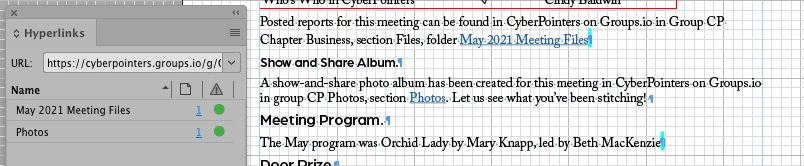
I get to the right place when I click the green dot, but nothing happens when I click the blue underlined text. I am baffled. This always worked in the past.
Should still work. I just tested that with InDesign 2021 on Windows 10:
When in the Hyperlinks panel:
Click the page number before the dot to select the source of the hyperlink, in your case the text.
Click the green dot to go to the hyperlink destination, your browser will show the destination web page.
Also working: Two options with the Hyperlinks panel if a hyperlink is selected:
Go To Source and Go To Destination
Hm. You should be able to apply a custom keyboard shortcut for both menus.
Regards,
Uwe Laubender
( ACP )
Already have an account? Login
Enter your E-mail address. We'll send you an e-mail with instructions to reset your password.
 AdChoices