
Participant
April 3, 2023
Answered

Hyphenation exceptions conflicts

  • April 3, 2023
  • 2 replies
  • 679 views

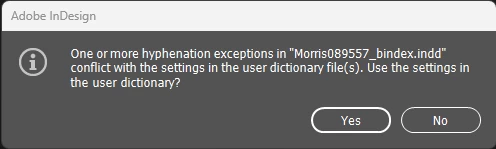
When I open some files in Indesign, I get the warning message ‘One or more hyphenation exceptions in “filename” conflict with the settings in the user dictionary file(s). Use the settings in the user dictionary?’ The question is: how can I find out what exactly these conflicts are?


Correct answer Mike Witherell

Hi Daniel,

Did you visit Preferences > Dictionary > Hyphenation Exceptions: Compose Using...? What is it set to?


You can export word lists to a text file (.txt) and then import that list of words into a user dictionary in InDesign. The words in the text file must be separated by a space, tab, or paragraph return. You can export added words and removed words, but you cannot export ignored words, which are used only in the current session.

Select Edit > Spelling > User Dictionary.

Select the TargetLanguage, and Dictionary List.

  • Select Import, locate the text file with your list of spelling exceptions, and then select Open.
  • Select Export, specify the filename and location, and then select Save.

The list of words is saved in a text file. You can edit this list of words in any text editor, and then import the word list. You can also send the word list to others, who can import it into their user dictionaries.

2 replies

Mike Witherell
Community Expert
Mike WitherellCommunity ExpertCorrect answer
Community Expert
June 5, 2025

Hi Daniel,

Did you visit Preferences > Dictionary > Hyphenation Exceptions: Compose Using...? What is it set to?


You can export word lists to a text file (.txt) and then import that list of words into a user dictionary in InDesign. The words in the text file must be separated by a space, tab, or paragraph return. You can export added words and removed words, but you cannot export ignored words, which are used only in the current session.

Select Edit > Spelling > User Dictionary.

Select the TargetLanguage, and Dictionary List.

  • Select Import, locate the text file with your list of spelling exceptions, and then select Open.
  • Select Export, specify the filename and location, and then select Save.

The list of words is saved in a text file. You can edit this list of words in any text editor, and then import the word list. You can also send the word list to others, who can import it into their user dictionaries.

Mike Witherell
Inspiring
June 5, 2025

Hi Mike,

It was set to "Dictionary and Document". Chanigng it to Dictionary only solved the issue. Thanks!

Mike Witherell
Community Expert
Community Expert
April 3, 2023

Visit Edit menu > Spelling > User Dictionary... and check on Added Words and possibly also Removed Words lists.

Mike Witherell
Participant
April 3, 2023

HI Mike Witherell


It works, Thanks....