
Participating Frequently
May 27, 2021
Answered

Hypnation results to two hyphens in one word

  • May 27, 2021
  • 3 replies
  • 1634 views

Some months ago something changed with the automatic hypnation of text in my documents. Some words that are hypnated get a hyphen at the end of the first part (normal), but also at the beginning of the second part that is placed on the next line. Now I have to manualy adjust this. I don't understand why this started and how to fix it. Thanks for your suggestions.
This topic has been closed for replies.
Correct answer sunny.sunny

That looks promising! But sadly I don't have the same result here...


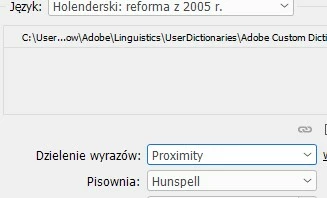
Try to change your dictionary hyphenation to Proximity:

3 replies

Community Expert
May 28, 2021

And just a remark about the hyphenation behavior with language "Dutch" ( not Dutch: 2005 Reform ).

With language "Dutch" it is alright, that after the hyphen the dash is maintained in the next line of text:


Regards,
Uwe Laubender

( ACP )

Participating Frequently
May 28, 2021

Hi Laubener, thats interesting! I admire your determination to get to the bottom of this problem. It indead looks like a bug, because I've tried several parts of the solution before. Thanks for your time and the fact that I feel less incompetent in fixing it.

Community Expert
May 28, 2021

Hi M.M.J.B82A,

I see the same issue when I open your InDesign document with my German InDesign 2021.

And I also was in trouble to find the right settings so that the hyphenation of the text is the result you are expecting with the applied language for the text: Dutch: 2005 Reform.


Here the stages of my little journey:


[1] Opened an IDML file of your document, ignored the missing font warnings and headed for Preferences > Dictionary.

As you can see from my German InDesign the language of the dictionary is set to German: 2006 Reform. This setting is not specific to a document, it is for the application.


What is a specific preference for a document is Hyphenation. And that is set to Hunspell.

The word Oost-Azië is selected in the text and the hyphenation apparantly is the wrong one. The selected text is formatted with Language: Dutch: 2005 Reform


[2] If I now change my document related preferences for Hyphenation to Proximity, nothing changes. To be absolutely sure about this I answered my changes to the preferences with OK, opened them again and then took the screenshot:


[3] Hm. Now I was unsure what to do next and tried the following:
I changed the language of Hyphenation back to Hunspell and changed the language of the dictionary to Dutch: 2005 Reform. Still hyphenation of the word Oost-Azië was wrong:


[4] The next step was to change hyphenation back again to Proximity:

And now, finally, hyphenation of the selected word changed to the expected result!

And that without closing the Preferences panel with OK:


The crazy thing: After I had the right result with text hyphenation I could switch back the language of the dictionary to German: 2006 Reform without changing the hyphenation again.


So the expected hyphenation needed a kick by changing the language of the dictionary at least once. Together with a change of hyphenation to Proximity in the Preferences.


This behavior could hardly fell under category "good user experience".

That's a bug.


FWIW: As a last step I saved the document with a new name, closed it, opened it again and hyphenation of Oost-Azië was still alright.


Regards,
Uwe Laubender

( ACP )


//EDITED

sunny.sunny
Inspiring
May 27, 2021

What is the language of your text? In both British and American English hyphens are only at the end of the first line:

... so-

called ...

Participating Frequently
May 27, 2021

The language is Dutch. Also one hypen is needed. But when a word already has an hyphen like 'Oost-Azië' this happens:
...Oost-
-Azië...

sunny.sunny
Inspiring
May 27, 2021

Could you please send some part of this project in .indd? I'll have a look.