
jelle wouterv79879982
Known Participant
May 18, 2026
Question

I am dealing with a problem creating a interactive PDF. Some radiobuttons do not work when clicked

  • May 18, 2026
  • 5 replies
  • 136 views

I’m having trouble creating an interactive PDF file.

I have a form where people can choose a design using radio buttons. See the image below.
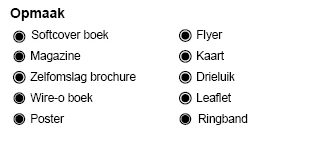
The radio buttons are supposed to show and hide specific fields, buttons, and text. This works correctly for the following options:

  • Softcover boek
  • Magazine
  • Zelfomslag brochure
  • Wire-o boek

However, the options Poster and Flyer do not show the correct fields.

For some extra context: all fields for the options above are placed on separate layers to make the workflow easier. All layers are visible. All interactive form fields have names that indicate which radio button they should be connected to.
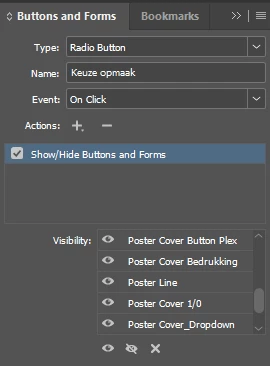
For some reason, the Poster radio button does not work correctly. It does not show the fields that belong to Poster. However, when I set some fields from Softcover boek to become visible when Poster is selected, those fields do appear.

So it seems the Poster button itself is working, but it is not showing the correct Poster-related fields.


Does anyone have an idea of what could be the problem?

    5 replies

    Community Expert
    May 21, 2026

    I created the Layer Visibility PDF and attached. First, from Indesign I deleted all show/hide actions of the radio buttons. Then made all forms on all layers visible instead of hidden. Export PDF including Layers. In Acrobat, set the radio button action to show each associated layer.

    Community Expert
    May 20, 2026

    Here is my theory: although the hide/show seem to be properly applied in Indesign, once written into the PDF, the order of actions taking place seem to be re-ordered causing unwanted shows when selecting other radio buttons.

    Dave’s suggestion of using layer visibility will certainly reduce the number of actions, but keep in mind layer visibility would have to be applied in Acrobat, not available in Indesign.

    Dave Creamer of IDEAS
    Community Expert
    Community Expert
    May 20, 2026

    The other option I gave about using multiple hide/show actions by category on the same button can be done in InDesign. You can’t name them actions for easy identification, but just clicking on them would show you what fields they affects (softcover, wire, etc.).

    David Creamer: Community Expert (ACI and ACE 1995-2023)
    Community Expert
    May 18, 2026

    Can you share the PDF?

    Have you checked all the actions of each radio button and the show/hide result? When there are many attributes involved, it is easy to overlook some.

    If all actions and visibility are set correctly  you can try saving the Indesign document to IDML and open this ID and export a new PDF. IDML can cleanup minor corruptions.

    jelle wouterv79879982
    Known Participant
    May 20, 2026

    Hi ​@Jeffrey_Smith,


    I have added the PDF and InDesign files to a question below. 


    Looking forward to your reply.


    Jelle Wouter

    Dave Creamer of IDEAS
    Community Expert
    Community Expert
    May 18, 2026

    What do the actions look like in Acrobat Pro?

    David Creamer: Community Expert (ACI and ACE 1995-2023)
    jelle wouterv79879982
    Known Participant
    May 20, 2026

    I can't see it that well in Acrobat Pro itself. It just looks like:


    Abhishek Rao
    Community Manager
    Community Manager
    May 18, 2026

    Hi @jelle wouterv79879982,


    Thanks for reaching out, and I'm sorry to hear you're running into this issue. Could you please confirm the exact version of InDesign you are using along with your OS details? Also, it would be very helpful if you could share a small screen recording demonstrating the complete workflow and the behavior you see when selecting the different radio buttons, so we can try to replicate and test this on our end.

    Additionally, kindly confirm whether this issue is happening only with this specific document or if you are able to reproduce it in other InDesign files as well.


    Looking forward to your update so we can investigate this further.

    Abhishek

    jelle wouterv79879982
    Known Participant
    May 19, 2026

    Hi ​@Abhishek Rao,

    Thanks for your reply.

    We are using Microsoft Windows 11 Enterprise. The InDesign Version is 21.3.

    As you can see in the added video the Poster radio button does not work. I have also added the InDesign file. 


    Screenshots:

    The Poster Layer


    The field names. All are set to show in the Buttons and Forms window.


    Looking forward to your reply. 

    Jelle Wouter

    leo.r
    Community Expert
    Community Expert
    May 19, 2026

    Are you viewing PDF in Acrobat?