Jeff Witchel, ACI
Community Expert
Community Expert
Aug 27, 2021 3:31 PM UTC
Answered

I can no longer marquis with the Zoom tool

Hi All,

Since the latest InDesign upgrade, I can no longer marquis with the Zoom tool to zoom to a certain area of a layout. When working on type, I used to marquis from margin-to-margin to make the width as large as possible to see what was happening.

Now InDesign's Zoom tool seems to work exactly the same way as in Illustrator and Photoshop. Click to make the view larger. Click and hold to Zoom in continuously. To me, neither of these methods are as fast or accurate as the marquis method.

Is there some sort of preference I'm missing to bring the"better" Zoom tool back? Or can Adobe add a  "Zoom to Width" command?

Thanks!

jamesraff
jamesraffCorrect answer
Participant
Mar 13, 2025 5:27 PM UTC

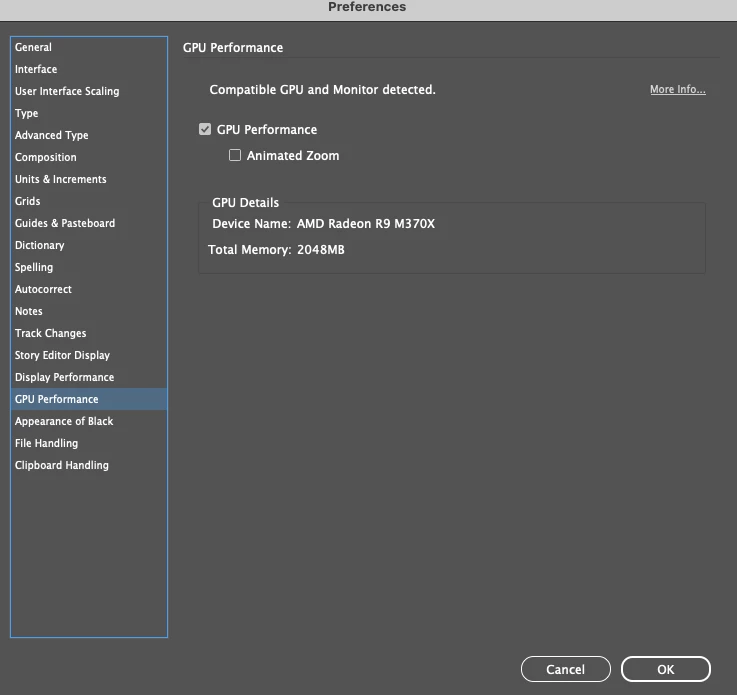
Path to solve:
Preferences >GPU Performance
Uncheck 'Animated Zoom'


4 replies

jamesraff
jamesraffCorrect answer
Participant
Mar 13, 2025 5:27 PM UTC

Path to solve:
Preferences >GPU Performance
Uncheck 'Animated Zoom'


Translate
Jeff Witchel, ACI
Community Expert
Community Expert
Aug 27, 2021 3:35 PM UTC

Found it! Using "Preview on CPU" fixes the issue.

Translate
Participating Frequently
Oct 5, 2022 9:46 PM UTC

Thanks, that was driving me crazy!!

Translate
Jeff Witchel, ACI
Community Expert
Community Expert
Oct 5, 2022 10:48 PM UTC

Happy to help!

Translate