
Participant
February 7, 2024
Answered

I can't figure out how to configure the parameters in Text Frame Baseline Options.

  • February 7, 2024
  • 2 replies
  • 408 views

I can't figure out how to configure the parameters in Text Frame Baseline Options. Marked them in green, thanks for your help.

This topic has been closed for replies.
Correct answer rob day

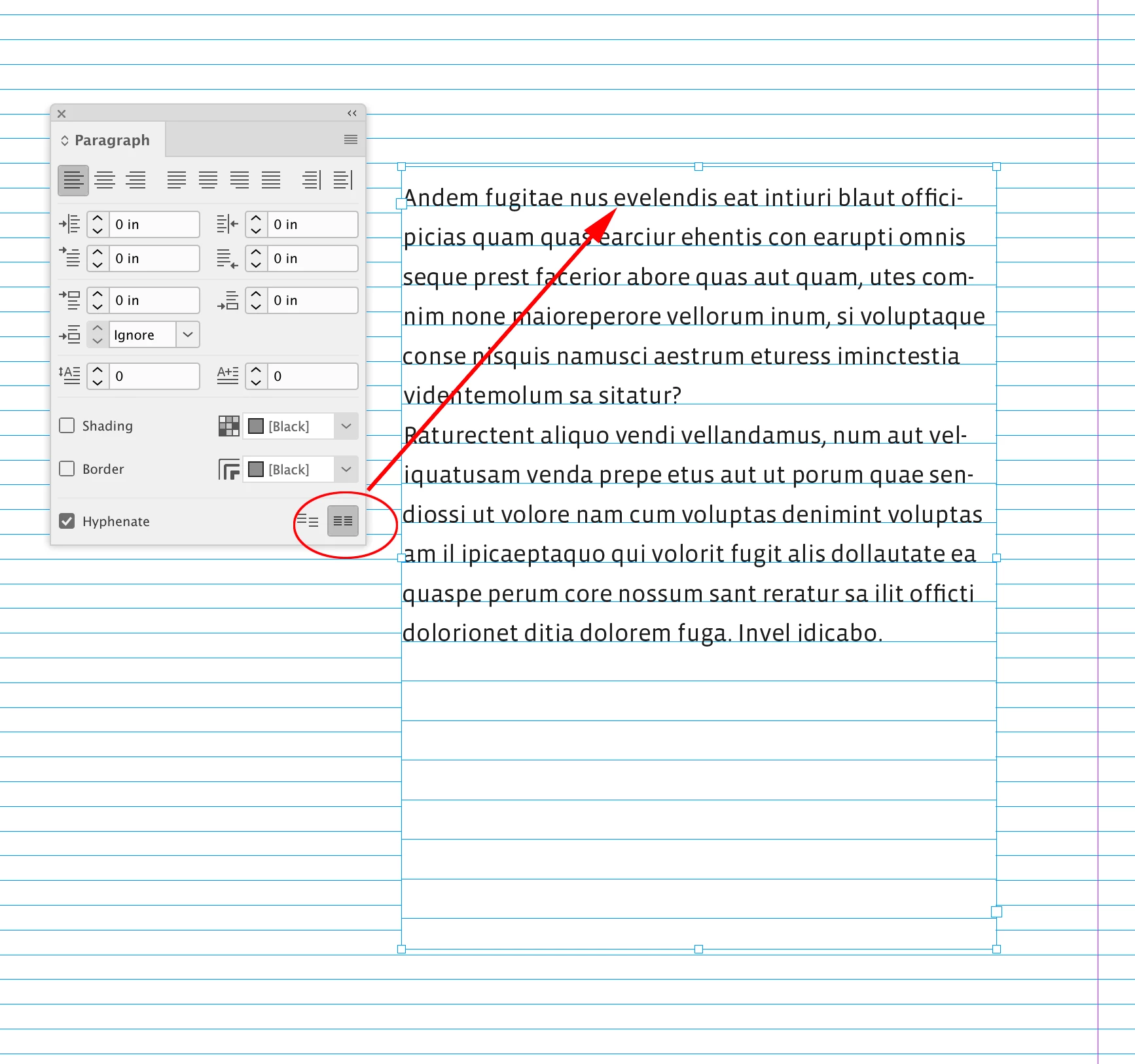
Hi @Даниил260879784iee , You would use the Baseline Grid options when you want a Text Frame’s Baseline grid to be different than the document’s Baseline Grid, which is set in Preferences>Grid. Also, the Text Frame’s text would not align to the custom grid until you select the text and set it to Align to baseline grid in the Paragraph or Paragraph Styles palette.


Here my document‘s grid is set to 10pt, and my Text Frame’s Object Style is set to 16pt:
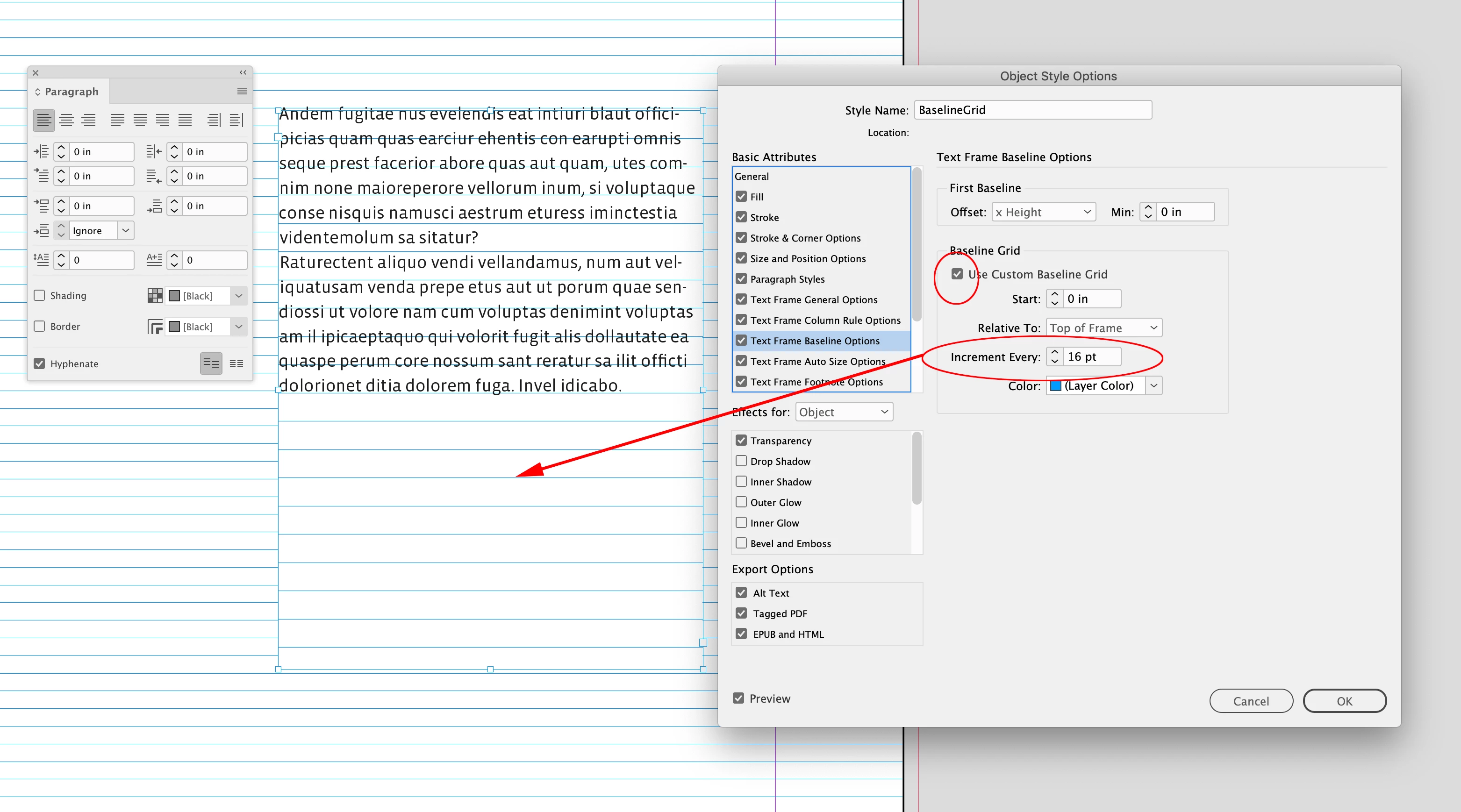


The text does not align to the custom baseline grid until I check Align to baseline grid in the Paragraph palette. When the the text is set to align to the baseline the First Baseline settings are ignored:
 

2 replies

rob day
Community Expert
rob dayCommunity ExpertCorrect answer
Community Expert
February 8, 2024

Hi @Даниил260879784iee , You would use the Baseline Grid options when you want a Text Frame’s Baseline grid to be different than the document’s Baseline Grid, which is set in Preferences>Grid. Also, the Text Frame’s text would not align to the custom grid until you select the text and set it to Align to baseline grid in the Paragraph or Paragraph Styles palette.


Here my document‘s grid is set to 10pt, and my Text Frame’s Object Style is set to 16pt:


The text does not align to the custom baseline grid until I check Align to baseline grid in the Paragraph palette. When the the text is set to align to the baseline the First Baseline settings are ignored:


Participant
February 8, 2024

Hi, this is very much appreciated, thank you

Community Expert
February 7, 2024

The option is available in the Preferences of the application because it's a 'document-wide' option. 

So you go the Adobe>Preferences (or Windows>Preferences) and set it up there.


The option you see here is for a Custom Grid - which you can setup if you wish and overrides the document preference

https://helpx.adobe.com/ie/indesign/using/grids.html#:~:text=You%20can%20set%20up%20a,color%20in%20the%20Color%20menu.


There's plenty of tutorials out there

https://www.indesignskills.com/tutorials/baseline-grid-indesign/


----

The other option you circled there - that's related to where the text starts - you have it starting at Accent which means the top of the text by the Accent of  a letter - like éáó etc. or text with umlauts or other things. 

And the minimum is the offset for this accent - so you could have the minimum 0px or 10px - and it would offset the text. 


Peter Spier
Community Expert
Community Expert
February 7, 2024

Actuallyu, Eugene, that's aScent, not aCcent, and refers to the tops of tall letters like f or h, though it may also catch diacritics.

Community Expert
February 8, 2024

I'm going for an eye test in a few weeks. Haven't had glasses yet but it's going that way for me.