
Participant
October 18, 2022
Answered

I can't put text on an image that has wrap around and is tilted

  • October 18, 2022
  • 1 reply
  • 413 views

Hello! I have this problem that even the customer support (on the phone) couldn't solve for me.

I have an image that is tilted at 30 degrees angle and wrap it around let's say 0.125 wrap all around. Then I create text bloc that I want to put ON TOP of the image but the system doesn't allow me. The only "Arrange" options in this case are (for the bloc text) "send backwards" or "send to back"... I tried everything: sending back the image, or send it forward and then send the text forward... nothing works, except if I "unwrap" the image but then all my paragraphs then go on top of it... Any help or advice? Even support couldn't find an answer.

My question is: does an image that is tilted and has wrap around allows text on top of it. Thanks

image attached: The image is in the back and the text in front of it... but apparently the wrap also influences the text on top...
This topic has been closed for replies.
Correct answer Eugene Tyson

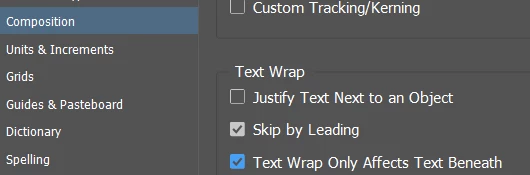
You can change the text wrap behaviour in the Preferences

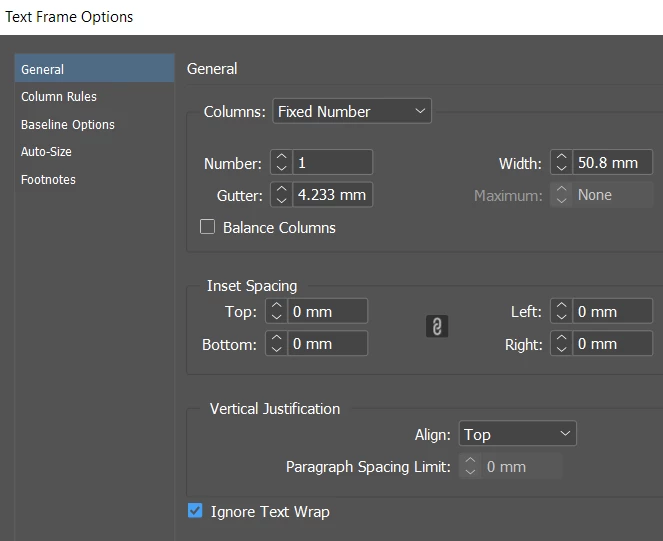
You can also set the caption frame to Ignore text wrap


In preferences you can try


And for the text frame itself you can try Ignore Text Wrap at the bottom.


1 reply

Eugene TysonCommunity ExpertCorrect answer
Community Expert
October 18, 2022

You can change the text wrap behaviour in the Preferences

You can also set the caption frame to Ignore text wrap


In preferences you can try


And for the text frame itself you can try Ignore Text Wrap at the bottom.


Participant
October 18, 2022

Eugene, you are the best. Right on! And with TWO correct answers!!! (you should work at Adobe, since today I went through THREE reps for hour and a half and no one of the three could figure it out, they'll call me tomorrow...) In any case thanks again 👍

Community Expert
October 18, 2022

Come back here anytime with queries! 

There's a whole community of experts here who are very helpful. 

This community rocks!