Participant
June 1, 2021
Question

I cannot open a file from ID CC 16.1 in 15.1 (2020)...

  • June 1, 2021
  • 1 reply
  • 329 views

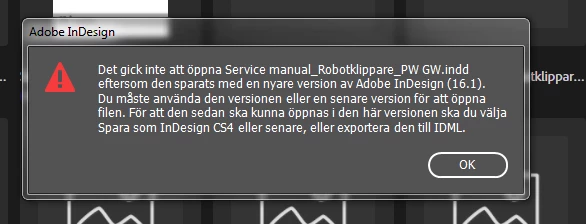
I cannot open a file from ID CC 16.1 in 15.1 although I´ve downgraded it to an earlier version that should work. A rough translation of the problem description reads as follows:

"It wasn´t possible to open Service manual_XXX since it has been saved by a newer version of Adobe Indesign (16.1). You have to use that version or a later one to open the file. To be able to later open it in this version you should choose Save as Indesign CS4 or later, or export it to IDML."

I have tried all of the above without success, the message does not go away, I have to turn the program off via the Activity handler (correct word?). It didn´t work to upgrade the program to 15.1 or restart the computer.

The error message (in swedish) can be viewed below:
This topic has been closed for replies.

1 reply

BobLevine
Community Expert
Community Expert
June 1, 2021

You'll need to open it in InDesign 2021 and export to IDML. It also appears you're still on Windows 7. It is long past time to move to Windows 10.

Participant
June 1, 2021

That´s exactly what we did, but the win7 might be part of the problem, but sadly, changing it is not up to me. 😕😕
Thanks!


Geоrge
Legend
June 1, 2021

Or you can ask here - https://forum.rudtp.ru/threads/zaprosy-na-ponizhenie-versii-indesign-indd-to-idml-indd-to-inx.44870/ (thread from Russian InDesign forum where users with new version can do fo you idml). 

Remember, never say you can't do something in InDesign, it's always just a question of finding the right workaround to get the job done. © David Blatner