
Rajkurt
Inspiring
October 1, 2017
解決済み

I DONT want my tables to flow and break across pages. Please help...

  • October 1, 2017
  • 返信数 2.
  • 11012 ビュー

Hello,

My tables are flwoing through my pages. But they sometime break off in the rows and continue on the next page. How do I get my tables to not break?

Btw, I have assigned a table style to all tables. Thanks in advance 🙂
    このトピックへの返信は締め切られました。
    解決に役立った回答 TᴀW

    Unfortunately, it does not seem to be a setting that can be applied as part of a table or cell style! :-(

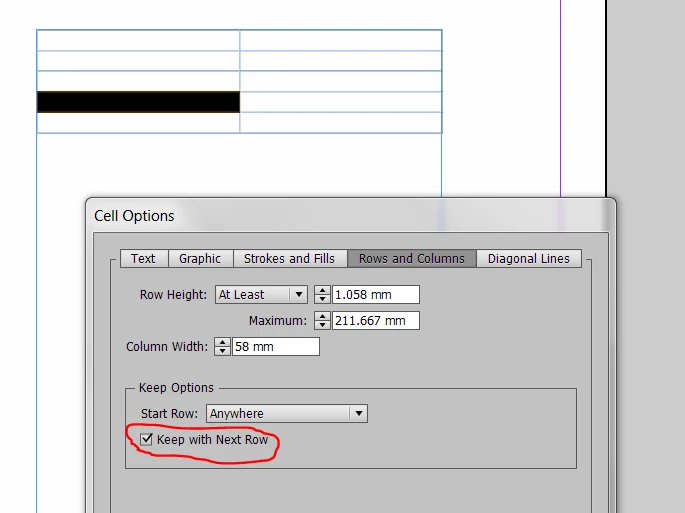
    Also, it's under Cell Options, not Table Options. So, select all the rows in the table, right click, go to Cell Options > Rows and Columns, and there you should see the Keep with Next Row option...

    返信数 2

    TᴀW
    Legend
    October 1, 2017

    If you want to keep all the rows of the table together, go to the Table Options > Rows, and tick the "Keep with next row" checkbox....

    id-extras.com | InDesign tools & scripts for typesetters, form designers, and translators
    TᴀW
    TᴀW解決!
    Legend
    October 1, 2017

    Unfortunately, it does not seem to be a setting that can be applied as part of a table or cell style! :-(

    Also, it's under Cell Options, not Table Options. So, select all the rows in the table, right click, go to Cell Options > Rows and Columns, and there you should see the Keep with Next Row option...

    id-extras.com | InDesign tools & scripts for typesetters, form designers, and translators
    Jongware
    Community Expert
    Community Expert
    October 1, 2017

    If you are going to do this manually, save a couple of clicks and selections and set the Keep Options of the table container paragraph to keep all lines together. That can also be done with a Change All.

    BobLevine
    Community Expert
    Community Expert
    October 1, 2017

    Are you asking how to keep it all on one page? If so, make them fit.

    Are you asking how to make cells break across pages? I'm afraid that isn't supported.

    Rajkurt
    Rajkurt作成者
    Inspiring
    October 1, 2017

    Thanks for your answer. I will try to clarify with this sreenshot. just dont want the tables to break as they are in this screenshot. I guess the same way you can do with paragraphs?

    BobLevine
    Community Expert
    Community Expert
    October 1, 2017

    That second row will not fit in that space. It's as simple as that.

    InDesign will not break a row so the entire row has to fit.