

Answered
I dug a hole for myself: the dialog box that I used to use normally no longer appears inexplicably.
After testing my InDesign script, I always get stuck and can't freely switch the taskbar.
I searched online for some methods that can disable dialog box interaction. I tested two or three of them and found them useless, so I deleted them.
Just now I suddenly realized that one of my scripts has never been modified recently, but the dialog box is not responding.
What should I do, re ID?
It seems like this:
https://www.indesignjs.de/indesignapi/indesign/ScriptPreference.html
Which one is the default?
//Set to never interact to avoid pop ups getting stuck on the interface
app.scriptPreferences.userInteractionLevel = UserInteractionLevels.NEVER_INTERACT;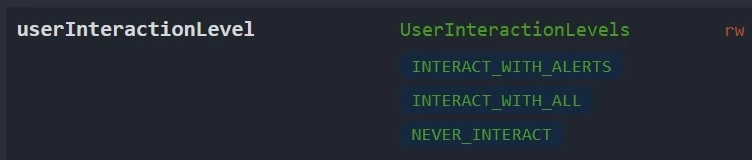
My dialog box looks like this:
makeDialog()
function makeDialog() {
    var theDialog = app.dialogs.add({ name: "aaaa ", canCancel: true, minHeight: 800, minWidth: 400, });
    with (theDialog.dialogColumns.add()) {
        staticTexts.add({ staticLabel: "only :" });
        staticTexts.add({ staticLabel: "Columns:" });
    }

    if (theDialog.show() == true) {
        theDialog.destroy();
    }
    else {
        exit();
    }
}

 AdChoices