Participant
October 13, 2025
Question

I get a slug on my page even when i don't ask for one!

  • October 13, 2025
  • 3 replies
  • 255 views

Hello! Thank you for your time. 


To keep it brief: 

- making an A5 flyer to send to a print shop

- can confirm the page size is 148 x 210mm

- have added a bleed of 3mm and margin of 3mm as requested by print shop

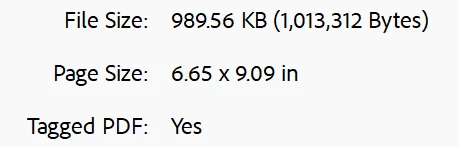
- when i export to PDF, the document far exceeds the 160 x 222mm, where it seems to have added another 9mm / 4.5mm each side. This doesn't seem to change if I try to turn off one or other or the corner markings. 


Please help! Many thanks



3 replies

Peter Spier
Community Expert
Community Expert
October 13, 2025

And you need tto change the offset of your marks...

The default distance is too small and leaves the marks in the bleed area. You should change that to at least the same as the bleed allowance to avoid any possibility the marks will show if the trim runs into the bleed.

Participant
October 14, 2025
Thanks - can you explain how?

Kind regards,

Sophie


Please note the new business address as of the 6th Jan 2023:
39 Fairfield Grove, Charlton, SE7 8UA
T: 07723708753 W: https://www.sm-architecture.uk E:
sophie@sm-architecture.uk
Peter Spier
Community Expert
Community Expert
October 14, 2025

There's a field in the export dialog where you specify the marks that allows yopu to set the offset. Just change it to the same value as your bleed, or slightly more.

rob day
Community Expert
Community Expert
October 13, 2025

Hi @Sophie McManus , When you export a PDF with Bleeds, Marks, and Slug the dimension listed in Acrobat’s Properties includes the Marks—it’s not the Trim size. You can check Acrobat’s Preflight and get the document’s Trim Box:


Abhishek Rao
Community Manager
Community Manager
October 13, 2025

Hi @SophieMcManus,


Thanks for sharing the details and screenshots. Please check for any slug field values in the File > Document Setup. If there are, set them all to zero. Then, when exporting, ensure Use Document Bleed Settings is checked but Include Slug Area is unchecked.

After doing that, try exporting again, and the final PDF size should match the expected dimensions with bleed included.


Please let me know if that works.

Abhishek