

dublove
Legend
May 8, 2026
Answered

I have a few questions about 'doc.undo()'

  • May 8, 2026
  • 4 replies
  • 41 views

Hi everyone~

Can I specify the number of steps to undo? Or can I only undo the last step?
Or undo a specific function? Alternatively, you can specify a range to undo.


Second question: I’m using `undo()` in my code, but I’ve found that I can no longer use the global single-step undo feature (app.doScript(main, ScriptLanguage.JAVASCRIPT, undefined, UndoModes.ENTIRE_SCRIPT, 'name')).


If that's the case, there won't be any reaction.

try {
app.doScript(main, ScriptLanguage.JAVASCRIPT, undefined, UndoModes.ENTIRE_SCRIPT, 'name')
} catch (e) { };

Thank you.
 

    Correct answer rob day

    Or undo a specific function?


    You can use doScript to call and undo a specific function. Here I’m using doScript to call the stepRepeat function where a is the number of columns, rows, and the gap ammount—the array is passed in via the 3rd parameter [3,4,10]:


    /**
    * Step and repeat
    * @ param an array of values for number of columns, rows, and gap space
    * @ return void
    *
    */
    function stepRepeat(a){
    app.scriptPreferences.measurementUnit = MeasurementUnits.POINTS;
    var c = a[0]; //columns
    var r = a[1]; //rows
    var g = a[2]; //gap

    var sel = app.activeDocument.selection[0]
    var b = sel.geometricBounds;
    var xoff = b[1];
    var yoff = b[0];

    for (var i = 1; i < c*r; i++){
    if(i%c>0){
    xoff = xoff + g + (b[3]-b[1])
    sel.duplicate([xoff,yoff])
    }else{
    xoff = b[1];
    yoff = yoff + g + (b[2]-b[0])
    sel.duplicate([xoff,yoff])
    }
    }
    app.scriptPreferences.measurementUnit = AutoEnum.AUTO_VALUE;
    }

    //Call stepRepeat function, code is JAVASCRIPT, an array of values to pass in, undo mode, string to show in Edit menu
    app.doScript(stepRepeat, ScriptLanguage.JAVASCRIPT, [3,4,10], UndoModes.ENTIRE_SCRIPT, 'Grid');


    https://www.indesignjs.de/extendscriptAPI/indesign-latest/#Application.html#d1e42351__d1e45927

    4 replies

    dublove
    dubloveAuthor
    Legend
    May 8, 2026

    Hi rob day.

    My doc.undo() is mainly used to temporarily obtain values, just like the undoing of image transformations you taught me last time.
    Instead of revoking it for the sake of regretting.
    Sometimes, I need to undo multiple steps, but I find it too cumbersome to write.

    Thank you,

    I learned another trick: putting multiple parameters in app.doScript.
    I used to nest another function to accommodate multiple parameters.

    rob day
    Community Expert
    Community Expert
    May 8, 2026

    Can I specify the number of steps to undo?


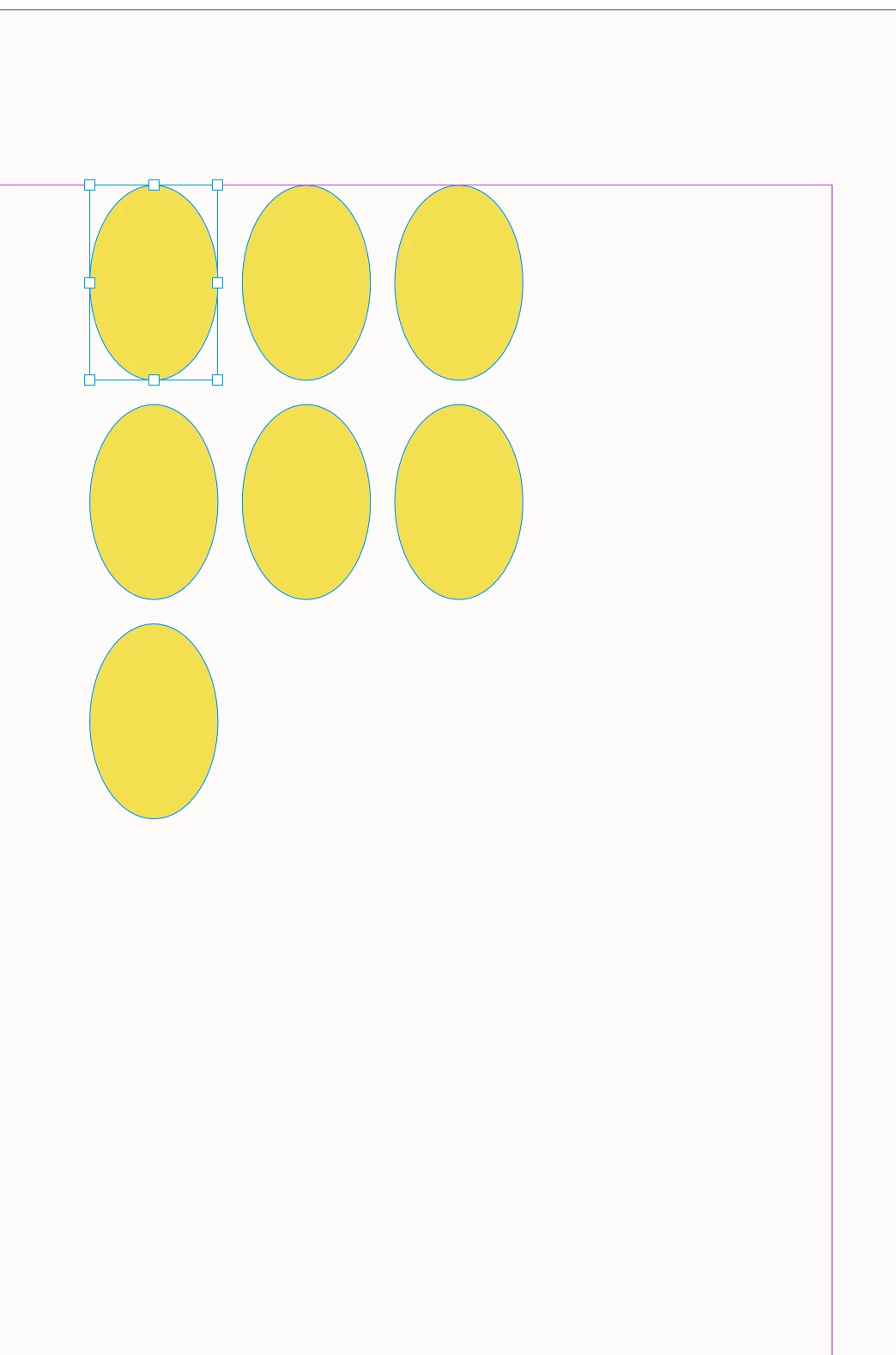
    Also, you could use a while statement to call a specific number of undos. Here I’m not using doScript, and undoing 5 of the 12 oval duplicates:


    //Call stepRepeat function, code is JAVASCRIPT, an array of values to pass in, undo mode, string to show in Edit menu
    //app.doScript(stepRepeat, ScriptLanguage.JAVASCRIPT, [3,4,10], UndoModes.ENTIRE_SCRIPT, 'Grid');

    stepRepeat([3,4,10])
    var u = 5;
    while (u--) {app.activeDocument.undo()}


    Community Expert
    May 8, 2026

    Hi dublove,

    `doc.undo()` is fairly blunt. It only undoes the last undoable action in the document history. You cannot tell it “undo 3 steps”, “undo this function only”, or “undo this range of operations” in the way you might with a custom transaction system.

    If you need grouped undo behaviour, the better approach is usually to wrap the script in `app.doScript()` with `UndoModes.ENTIRE_SCRIPT`, so the whole script becomes one undo step:

    javascript
    app.doScript(
        main,
        ScriptLanguage.JAVASCRIPT,
        undefined,
        UndoModes.ENTIRE_SCRIPT,
        "My Script Name"
    );
     

    But mixing `doc.undo()` inside a script that is itself wrapped as `UndoModes.ENTIRE_SCRIPT` can cause problems, because you are trying to manipulate the undo stack while InDesign is also trying to treat the full script as one undo transaction.

    Also, this part is hiding any error:

    javascript
    try {
        app.doScript(main, ScriptLanguage.JAVASCRIPT, undefined, UndoModes.ENTIRE_SCRIPT, 'name')
    } catch (e) { };
     

    I would change it temporarily to:

    javascript
    try {
        app.doScript(main, ScriptLanguage.JAVASCRIPT, undefined, UndoModes.ENTIRE_SCRIPT, "name");
    } catch (e) {
        alert(e);
    }
     

    That should show whether the script is actually failing.

    In short: use `doc.undo()` only when you really need to undo the previous document action. For normal script behaviour, avoid calling `undo()` inside the script and let `UndoModes.ENTIRE_SCRIPT` handle the single-step undo after the script has finished.
     

    dublove
    dubloveAuthor
    Legend
    May 8, 2026

    Hi Eugene Tyson

    Thanks.
    I see.
    When I was testing, I always felt that app.doScrip() sometimes reported inaccurate error line numbers, so I would comment it out.
    Write another main();

    rob day
    Community Expert
    rob dayCommunity ExpertCorrect answer
    Community Expert
    May 8, 2026

    Or undo a specific function?


    You can use doScript to call and undo a specific function. Here I’m using doScript to call the stepRepeat function where a is the number of columns, rows, and the gap ammount—the array is passed in via the 3rd parameter [3,4,10]:


    /**
    * Step and repeat
    * @ param an array of values for number of columns, rows, and gap space
    * @ return void
    *
    */
    function stepRepeat(a){
    app.scriptPreferences.measurementUnit = MeasurementUnits.POINTS;
    var c = a[0]; //columns
    var r = a[1]; //rows
    var g = a[2]; //gap

    var sel = app.activeDocument.selection[0]
    var b = sel.geometricBounds;
    var xoff = b[1];
    var yoff = b[0];

    for (var i = 1; i < c*r; i++){
    if(i%c>0){
    xoff = xoff + g + (b[3]-b[1])
    sel.duplicate([xoff,yoff])
    }else{
    xoff = b[1];
    yoff = yoff + g + (b[2]-b[0])
    sel.duplicate([xoff,yoff])
    }
    }
    app.scriptPreferences.measurementUnit = AutoEnum.AUTO_VALUE;
    }

    //Call stepRepeat function, code is JAVASCRIPT, an array of values to pass in, undo mode, string to show in Edit menu
    app.doScript(stepRepeat, ScriptLanguage.JAVASCRIPT, [3,4,10], UndoModes.ENTIRE_SCRIPT, 'Grid');


    https://www.indesignjs.de/extendscriptAPI/indesign-latest/#Application.html#d1e42351__d1e45927