Participant
January 21, 2024
Answered

I have a random second line around my text box in indesign

  • January 21, 2024
  • 2 replies
  • 311 views

Hi, i have a question:


I have two different kind of text boxes in my file. I have a text bo which looks normal with one blue line but I have done something probably so I can't make those normal text boxes anymore. I can only make a text box with a secon blue line around it and i have no idea how to change it.  The second line is around every box or shape that i make, i just noticed it. 
This topic has been closed for replies.
Correct answer Steve Werner

I think @Eugene Tyson  is right.


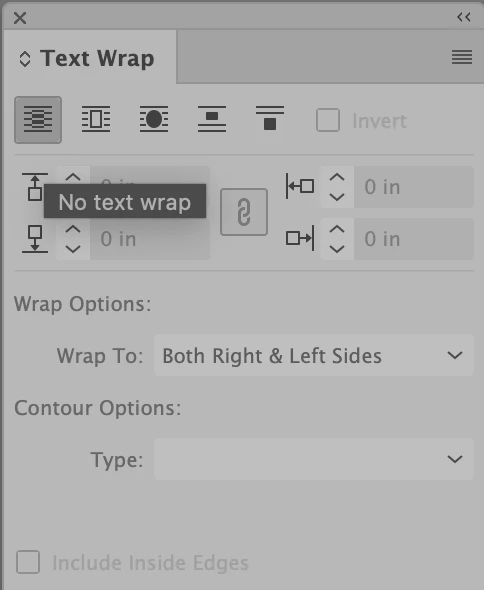
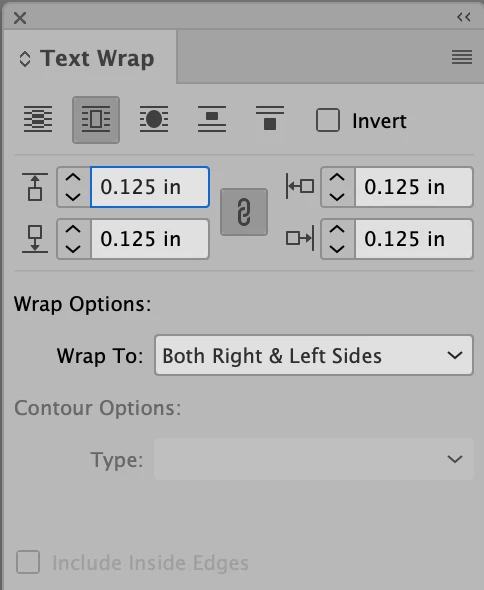
Stert with no document open, and open the Text Wrap panel (Window > Text Wrap).


Probably it now looks like this when you view it:


Choose the left-most button to turn off text wrap:


That should remove the wrap appearing around your text frams.

2 replies

Steve Werner
Community Expert
Steve WernerCommunity ExpertCorrect answer
Community Expert
January 21, 2024

I think @Eugene Tyson  is right.


Stert with no document open, and open the Text Wrap panel (Window > Text Wrap).


Probably it now looks like this when you view it:


Choose the left-most button to turn off text wrap:


That should remove the wrap appearing around your text frams.

Community Expert
January 21, 2024

Looks like text wrap is applied to the frame.


https://helpx.adobe.com/ie/indesign/using/text-wrap.html#:~:text=To%20display%20the%20Text%20Wrap,want%20to%20wrap%20text%20around.


If it has become default for all text frames then turn it off before creating any new frames.