

justfix
Participating Frequently
March 31, 2023
Answered

I have problem with this InDesign script

  • March 31, 2023
  • 1 reply
  • 345 views

I have Indesign document with 366 qrcdoe and news source I find this script and edit it to GROUP any qrcode with specific object style (qrcode) and any text with specific paragraph style (مصدر الخبر) individually each page in entire document


var myDoc = app.activeDocument;
// Loop through each page in the document
for (var i = 0; i < myDoc.pages.length; i++) {
  var currentPage = myDoc.pages[i];
  // Find all the page items on the current page that have the object style named "qrcode"
  var qrcodes = currentPage.getElements({objectType: Oval, appliedObjectStyles: "qrcode"});
  // Find all the text frames on the current page that have the paragraph style named "مصدر الخبر"
  var newsSources = currentPage.getElements({objectType: TextFrame, appliedParagraphStyle: "مصدر الخبر"});
  // Loop through each QR code and group it with its associated news sources
  for (var j = 0; j < qrcodes.length; j++) {
    var currentQRCode = qrcodes[j];
    // Find all the news source text frames associated with the current QR code
    var associatedNewsSources = currentQRCode.associatedXMLElements.getElements({objectType: TextFrame, appliedParagraphStyle: "مصدر الخبر"});
    // If there are associated news sources, group them together
    if (associatedNewsSources.length > 0) {
      var currentGroup = currentPage.groups.add([currentQRCode].concat(associatedNewsSources));
      currentGroup.move(currentPage);
    }
  }
  // Loop through each news source text frame and group it with its associated QR codes
  for (var k = 0; k < newsSources.length; k++) {
    var currentNewsSource = newsSources[k];
    // Find all the QR codes associated with the current news source
    var associatedQRCodes = currentNewsSource.getElements({objectType: Oval, associatedXMLElements: "مصدر الخبر"});
    // If there are associated QR codes, group them together
    if (associatedQRCodes.length > 0) {
      var currentGroup = currentPage.groups.add([currentNewsSource].concat(associatedQRCodes));
      currentGroup.move(currentPage);
    }
  }
}
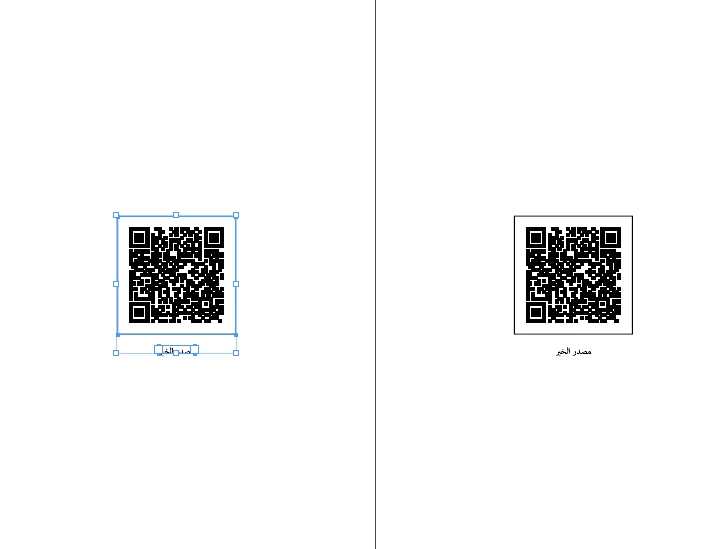


But when I Run Script I have this Problem
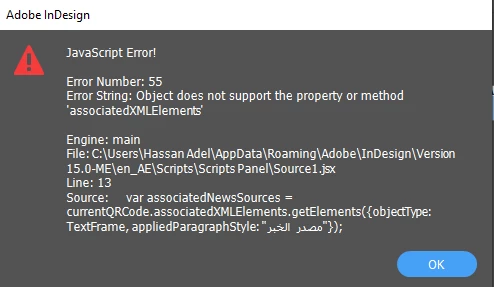
is there any help I well be appreciated


This topic has been closed for replies.
Correct answer rob day

Hi @justfix , The error is happening because an oval object doesn’t have a collection of associatedXMLElements—it can have a single .associatedXMLElement property.


You shouldn’t need XML to get paragraphs and objects with a certain styles applied. Something like this might work:


var pgs = app.activeDocument.pages;
for (var i = 0; i < pgs.length; i++){
    //change "MyStyle" to the name of your style
    groupQR(pgs[i], "MyStyle", "qrcode")
};   

/**
* Group a page’s QR codes with text frames
* @ param target page 
* @ param paragrap style to get 
* @ param object style to get 
* @ return void 
*/
function groupQR(pg, ps, os){
    //the page’s page items
    var api = pg.allPageItems;
    var p; 
    var gr=[];
    for (var i = 0; i < api.length; i++){
        if (api[i].constructor.name == "TextFrame") {
            p = api[i].parentStory.paragraphs
            for (var j = 0; j < p.length; j++){
                if (p[j].appliedParagraphStyle.name == ps) {
                    gr.push(p[j].parentTextFrames[0])
                } 
            };   
        }
        if (api[i].appliedObjectStyle.name == os) {
            gr.push(api[i])
        } 
    };   
    try {
        pg.groups.add(gr)
    }catch(e) {}  
}


1 reply

rob day
Community Expert
rob dayCommunity ExpertCorrect answer
Community Expert
April 1, 2023

Hi @justfix , The error is happening because an oval object doesn’t have a collection of associatedXMLElements—it can have a single .associatedXMLElement property.


You shouldn’t need XML to get paragraphs and objects with a certain styles applied. Something like this might work:


var pgs = app.activeDocument.pages;
for (var i = 0; i < pgs.length; i++){
    //change "MyStyle" to the name of your style
    groupQR(pgs[i], "MyStyle", "qrcode")
};   

/**
* Group a page’s QR codes with text frames
* @ param target page 
* @ param paragrap style to get 
* @ param object style to get 
* @ return void 
*/
function groupQR(pg, ps, os){
    //the page’s page items
    var api = pg.allPageItems;
    var p; 
    var gr=[];
    for (var i = 0; i < api.length; i++){
        if (api[i].constructor.name == "TextFrame") {
            p = api[i].parentStory.paragraphs
            for (var j = 0; j < p.length; j++){
                if (p[j].appliedParagraphStyle.name == ps) {
                    gr.push(p[j].parentTextFrames[0])
                } 
            };   
        }
        if (api[i].appliedObjectStyle.name == os) {
            gr.push(api[i])
        } 
    };   
    try {
        pg.groups.add(gr)
    }catch(e) {}  
}


justfix
justfixAuthor
Participating Frequently
April 1, 2023

@rob day thank you so much your script really works, and every qrcode with news source become grouped