Known Participant
May 26, 2020
Answered

I keep losing my Book window?

  • May 26, 2020
  • 5 replies
  • 1537 views

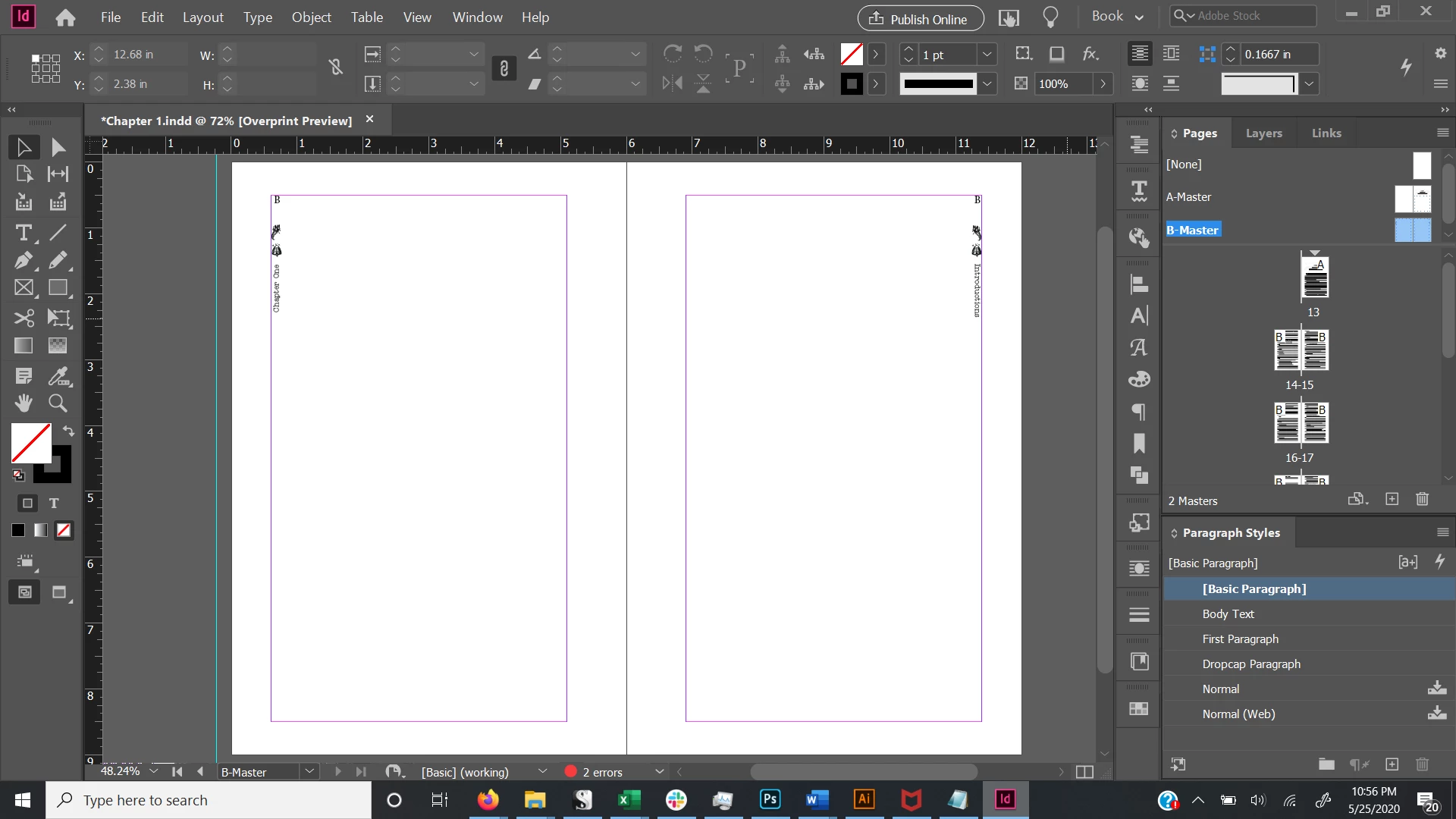
This seems like a really obvious question, but I can't figure it out, and searching for an answer on the forums hasn't given me anything. When I click out of the book panel, it disappears, and I can't find it again without closing ID and then reopening the book. I can dock it in one of my panels, but sometimes it escapes before I can do that. This is my layout:

any idea where it's hiding?


Thanks


This topic has been closed for replies.
Correct answer Randy Hagan

It's not you. Windows is designed to operate this way.


Your Book panel is a floating panel describing a separate file than your InDesign document. Since you have your InDesign application window set for full screen, by design the Windows operating system sets it to be displayed to the exception of any other applications on your screen.


While your Book panel isn't a separate application per se, it is considered a different document open within InDesign by Windows and will be put behind your full-screen InDesign application window for your document.


You can fix this by removing the full-screen view and then adjusting the size of the application window to take up your full screen. The effect will be the same, but the complication you're dealing with should no longer be an issue.Laubender's answer here is also worth remembering: like any other InDesign file open in the application, your book file will be listed at the bottom of the Window pull-down menu. So if it's open, your book file is only a couple of clicks away.


Hope this helps,


Randy


5 replies

Community Expert
January 26, 2023

@Seonaidh28116063qzep said:
"I've been trying this approach with no luck - and I need to export a manuscript ASAP."


Hi,

are you sure that your book file is not listed at the bottom of the main menu Window?

If not, it's not open anymore. Open it with the File > Open dialog.

If it is listed, perhaps, and I saw this once, the book file window is behind the application frame of the layout window of the active document.


Regards,
Uwe Laubender
( Adobe Community Expert )

Randy Hagan
Community Expert
Randy HaganCommunity ExpertCorrect answer
Community Expert
May 26, 2020

It's not you. Windows is designed to operate this way.


Your Book panel is a floating panel describing a separate file than your InDesign document. Since you have your InDesign application window set for full screen, by design the Windows operating system sets it to be displayed to the exception of any other applications on your screen.


While your Book panel isn't a separate application per se, it is considered a different document open within InDesign by Windows and will be put behind your full-screen InDesign application window for your document.


You can fix this by removing the full-screen view and then adjusting the size of the application window to take up your full screen. The effect will be the same, but the complication you're dealing with should no longer be an issue.Laubender's answer here is also worth remembering: like any other InDesign file open in the application, your book file will be listed at the bottom of the Window pull-down menu. So if it's open, your book file is only a couple of clicks away.


Hope this helps,


Randy


A.E.D.Author
Known Participant
May 27, 2020

Thank you, Randy and Laubender!!

Community Expert
May 26, 2020

Hi amyeds,

if a book file is open, it should be listed at the bottom of the Window menu, together with all opened InDesign documents.


Regards,
Uwe Laubender

( ACP )

Derek Cross
Community Expert
Community Expert
May 26, 2020

A perfect answer!

Derek Cross
Community Expert
Community Expert
May 26, 2020

Which version of InDesign and OS?

Can you explain why you are using the "Book" feature rather than "File > New > Document"?

(There can be good reasons for doing so but I'm asking in case you don't the difference.)

A.E.D.Author
Known Participant
May 26, 2020

I'm formatting a 200,000 word document. I've found it easiest to save each chapter as its own document and then compile them using the book feature. 

A.E.D.Author
Known Participant
May 26, 2020

It's indesign CC 2020 on Windows 10