
I lost another document in InDesign V21
Dear Indesign Dev Team:
You should remove Indesign V21 from Create Suite immediately. It is completly irresponsible, that you publish an app that destroys and eats up my files. Today I've lost the second client file in only a week.
There is obviously some real compatibility issue with Indesign V21 and Adobe Fonts. In this latest episode, I can open files in which fonts have been previously converted to paths, but I can no longer open my original files, were Adobe fonts are still present as fonts. I can obviously initially open them without a problem, work on them for some time, but then for some unkonwn reason and out of the blue, Indesign freezes when I load the file and I cannot open the document any longer.
I have worked with V21 and my latest document for over three days with no issue. I opened the docuemnts multiple times, saved it multiple times. No problem. Today I tried to open it again, the app then frooze and crashed. On the next startup of InDesign V21, it prompted me and said that the last file needed repair, then the file was nuked. This is the second document Indesign v21 destroyed on my Windows 11 PC in only a week. This are all important client files that I need for agency work.
The last document I worked on for over 35 hours, with 5 client revisions. File is now GONE !!!!!!!!!!!!!!!!!!!!!!!!!!!!!!!!!!!!!!!!!!
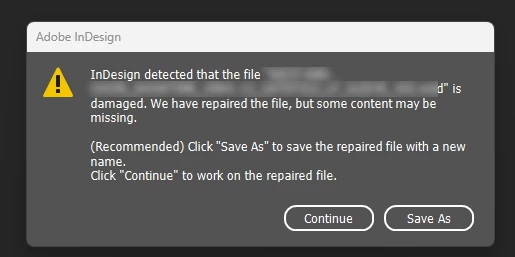
Adobe, you are completely irresponsible and unprofessional. You are treating us like guinea pigs. Naturally I am really upset. I have many client deadlines and can't even get basic tasks done. I now have to try to do client revisions on a file which only has fonts as paths. A real nightmare.


 AdChoices