dublove
Legend
September 19, 2025
Answered

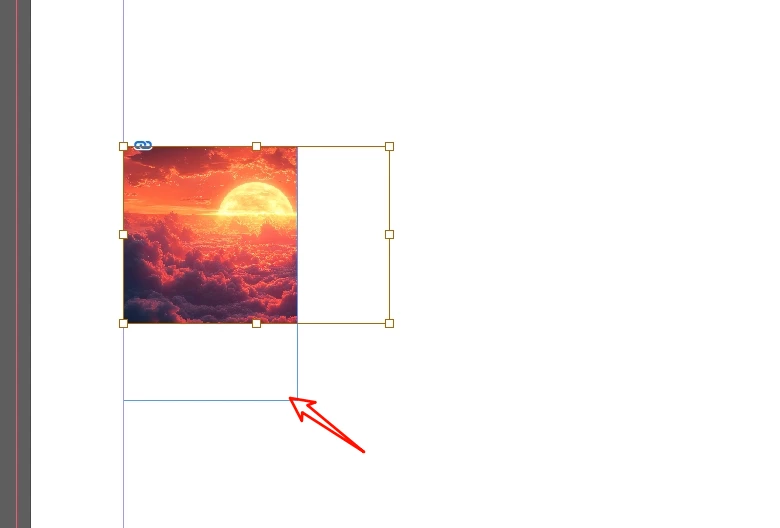
I only want to shrink the image frame without affecting the cropped portion.

  • September 19, 2025
  • 1 reply
  • 270 views

I only want to shrink the bottom frame without affecting the cropped section on the right.


sel.fit(FitOptions.FRAME_TO_CONTENT);
sel.fit(FitOptions.FILL_PROPORTIONALLY);

Neither seems to work. Is there a better solution?


Correct answer m1b

It isn't that complicated. You don't need `getGraphics` function if you already have the graphic some other way. You can move the `intersection` logic inside the `intersectionOfGraphicFrame` function. The whole thing—minus the checking and getting—boils down to this one operation:

graphic.parent.geometricBounds =  [
    graphic.geometricBounds[0] > graphic.parent.geometricBounds[0] ? graphic.geometricBounds[0] : graphic.parent.geometricBounds[0],
    graphic.geometricBounds[1] > graphic.parent.geometricBounds[1] ? graphic.geometricBounds[1] : graphic.parent.geometricBounds[1],
    graphic.geometricBounds[2] < graphic.parent.geometricBounds[2] ? graphic.geometricBounds[2] : graphic.parent.geometricBounds[2],
    graphic.geometricBounds[3] < graphic.parent.geometricBounds[3] ? graphic.geometricBounds[3] : graphic.parent.geometricBounds[3],
];


The larger issue is you don't always do a very good job of giving us examples that cover all your needs. The code I wrote works perfectly on your example document. But now you are talking about the `fit` method—which has nothing to do with your example. I know it can be hard., but try to supply examples that cover all your cases.

- Mark

1 reply

m1b
Community Expert
Community Expert
September 20, 2025

Hi @dublove, like this ...

/**
 * @file Intersect Graphic Frame.js
 *
 * Example, setting the selected graphics' frames size to match the intersection of their bounds.
 *
 * @author m1b
 * @version 2025-09-20
 * @discussion https://community.adobe.com/t5/indesign-discussions/i-only-want-to-shrink-the-image-frame-without-affecting-the-cropped-portion/m-p/15512777
 */
function main() {

    var doc = app.activeDocument;
    var graphics = getGraphics(doc.selection);

    for (var i = 0; i < graphics.length; i++)
        intersectionOfGraphicFrame(graphics[i]);

};
app.doScript(main, ScriptLanguage.JAVASCRIPT, undefined, UndoModes.ENTIRE_SCRIPT, 'Intersect Graphic Frames');

/**
 * Returns graphics derived from `items`.
 * @author m1b
 * @version 2025-08-20
 * @param {Array|PageItem} items - array or collection or page item.
 */
function getGraphics(items) {

    var graphics = [];

    if ('Array' === items.constructor.name) {

        for (var i = 0; i < items.length; i++)
            graphics = graphics.concat(getGraphics(items[i]));

    }

    else if (
        items.hasOwnProperty('allGraphics')
        && items.allGraphics.length > 0
    )
        graphics = graphics.concat(items.allGraphics);

    else if (
        items.hasOwnProperty('allPageItems')
        && items.allPageItems.length > 0
    )
        graphics = graphics.concat(getGraphics(items.allPageItems));

    else if ('Image' === items.constructor.name) {
        graphics.push(items);
    }

    return graphics;

};

/**
 * Sets the graphic's container's size to match the intersection of their bounds.
 * @author m1b
 * @version 2025-09-20
 * @param {PageItem} graphic - a page item contained in another page item.
 */
function intersectionOfGraphicFrame(graphic) {

    if (
        !graphic
        || !graphic.parent
        || !graphic.parent.geometricBounds
    )
        return;

    graphic.parent.geometricBounds = intersection(graphic.geometricBounds, graphic.parent.geometricBounds);

};

/**
 * Returns the intersecting bounds of b0 and b1.
 * @param {Array<Number>} b0 - a bounds array.
 * @param {Array<Number>} b1 - a bounds array.
 */
function intersection(b0, b1) {

    return [
        b0[0] > b1[0] ? b0[0] : b1[0],
        b0[1] > b1[1] ? b0[1] : b1[1],
        b0[2] < b1[2] ? b0[2] : b1[2],
        b0[3] < b1[3] ? b0[3] : b1[3],
    ];

};
dublove
dubloveAuthor
Legend
September 20, 2025

Hi m1b.

Thank you very much.


I didn't expect it to be so complicated to implement.
I'm still experimenting, and it works best when combined with:

s.fit(FitOptions.FILL_PROPORTIONALLY);
s.fit(FitOptions.FRAME_TO_CONTENT);

If not handled properly, they will clash.
It might take some getting used to.

m1b
Community Expert
m1bCommunity ExpertCorrect answer
Community Expert
September 20, 2025

It isn't that complicated. You don't need `getGraphics` function if you already have the graphic some other way. You can move the `intersection` logic inside the `intersectionOfGraphicFrame` function. The whole thing—minus the checking and getting—boils down to this one operation:

graphic.parent.geometricBounds =  [
    graphic.geometricBounds[0] > graphic.parent.geometricBounds[0] ? graphic.geometricBounds[0] : graphic.parent.geometricBounds[0],
    graphic.geometricBounds[1] > graphic.parent.geometricBounds[1] ? graphic.geometricBounds[1] : graphic.parent.geometricBounds[1],
    graphic.geometricBounds[2] < graphic.parent.geometricBounds[2] ? graphic.geometricBounds[2] : graphic.parent.geometricBounds[2],
    graphic.geometricBounds[3] < graphic.parent.geometricBounds[3] ? graphic.geometricBounds[3] : graphic.parent.geometricBounds[3],
];


The larger issue is you don't always do a very good job of giving us examples that cover all your needs. The code I wrote works perfectly on your example document. But now you are talking about the `fit` method—which has nothing to do with your example. I know it can be hard., but try to supply examples that cover all your cases.

- Mark