


Participant
July 22, 2026
Answered

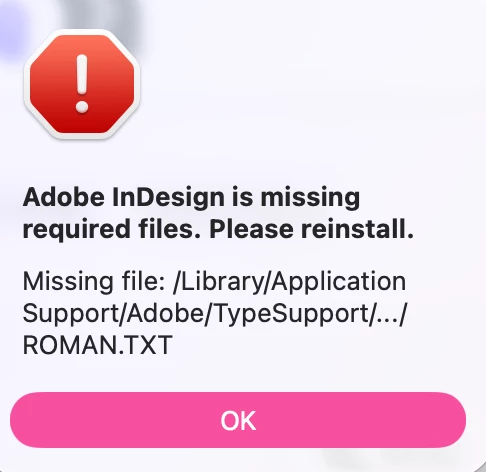
I recently cleaned my computer and a bunch of fonts have gone missing. When I start indesign it says it's missing required files. I tried repair and uninstalling and still getting this message.
  • July 22, 2026
  • 2 replies
  • 68 views

I also tried finding the missing files and placing but not sure what folder they go in exactly. 

    Correct answer Dave Creamer of IDEAS

    Try using the Adobe CC Cleaner to wipe everything out. 

    https://helpx.adobe.com/creative-cloud/apps/troubleshoot/diagnostics-repair-tools/run-creative-cloud-cleaner-tool.html

    2 replies

    leo.r
    Community Expert
    Community Expert
    July 22, 2026

    I recently cleaned my computer


    I wonder if you can specify how exactly you cleaned it? If you managed to delete some crucial system or Adobe-related files, the easiest solution might be to wipe out your hard drive and reinstall macOS from scratch. And then not to perform any kind of similar cleaning. 

    Dave Creamer of IDEAS
    Community Expert
    Community Expert
    July 22, 2026

    So you uninstalled InDesign and reinstalled it?

    David Creamer: Community Expert (ACI and ACE 1995-2023)
    Participant
    July 22, 2026

    Yes, I uninstalled the whole creative cloud and reinstalled it using Creative Cloud uninstaller.

    Dave Creamer of IDEAS
    Community Expert
    Dave Creamer of IDEASCommunity ExpertCorrect answer
    Community Expert
    July 22, 2026
    David Creamer: Community Expert (ACI and ACE 1995-2023)