Participant
March 2, 2021
Answered

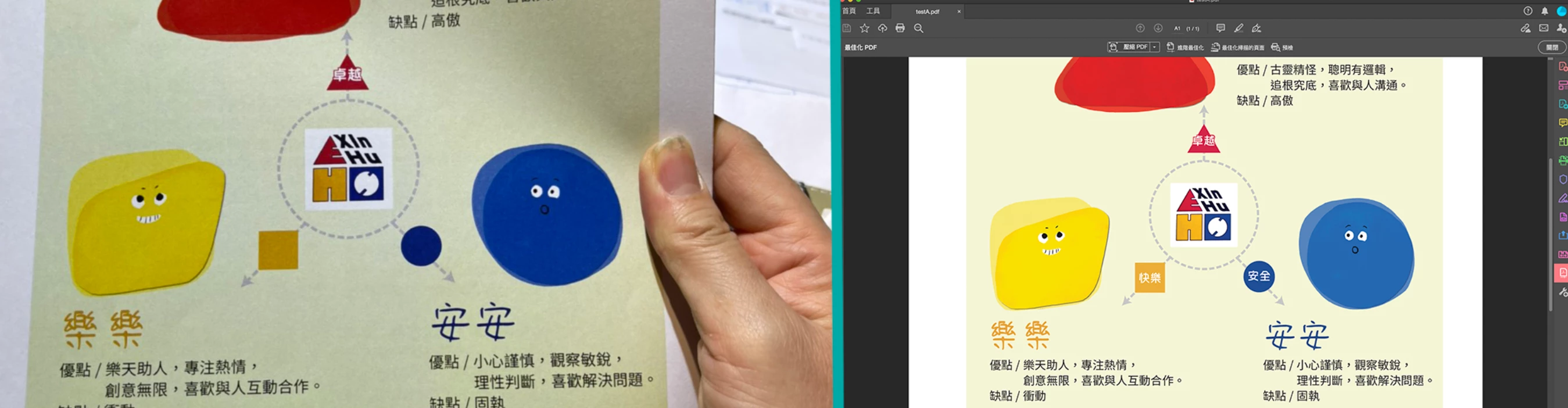
I saved to PDF, and it was no problem review in computer. But lost some text when I printed it out.

  • March 2, 2021
  • 2 replies
  • 297 views

I used InDesign to finish a report, and saved it to PDF so I could mail it to the print store to printed it out.

The PDF file looked fine in Acrobat DC, but when it printed out, some of the text were missing.

Is there setting I can change to avoid the problem when I save the InDesign file to PDF?

Thanks a lot~


Shu-han
This topic has been closed for replies.
Correct answer Luke Jennings3

The white type is likely set to overprint (Window> Output> Attributes). To see the overprinting in InDesign, you need to go to View> Overprint preview, to see the overprinting in Acrobat, the page display preference to show overprinting should be set to Always.

2 replies

Luke Jennings3
Community Expert
Luke Jennings3Community ExpertCorrect answer
Community Expert
March 2, 2021

The white type is likely set to overprint (Window> Output> Attributes). To see the overprinting in InDesign, you need to go to View> Overprint preview, to see the overprinting in Acrobat, the page display preference to show overprinting should be set to Always.

zakleAuthor
Participant
March 2, 2021

Thanks for the help!
Not familiar with the overprint function.
Problem solved! 🙂

Derek Cross
Community Expert
Community Expert
March 2, 2021

You would normally Export to Adobe PDF (Print) or use one of the Adobe PDF Presets, how did you produce your PDF?

zakleAuthor
Participant
March 2, 2021

Thanks for replying,
I exported my PDF by using Adobe PDF (Print), and used the default settings.