
dublove
Legend
May 4, 2026
Pregunta

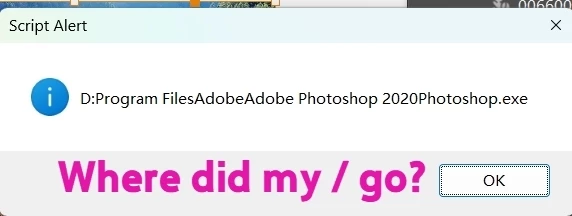
I've replaced all '\' characters with '/' in the path, but I can't see where the error is.

  • May 4, 2026
  • 3 respuestas
  • 62 visualizaciones
var oPath = "D:\Program Files\Adobe\Adobe Photoshop 2020\Photoshop.exe";
var nPath = oPath.replace(/\\/g, "\/");
alert(nPath);

 

    3 respuestas

    Community Expert
    May 4, 2026

    @dublove try to understand what we are trying to make you understand. If your code flow involves having the path as a string constant inside the code then to answer your question, it won’t work. If it is obtained from some API call, then the code will work no change needed.

    -Manan
    Community Expert
    May 4, 2026

    The issue is happening before your replace() even runs.
    var oPath = "D:\Program Files\Adobe\Adobe Photoshop 2020\Photoshop.exe";
    In that line, the \ characters are already being treated as escape sequences, so the string is not what you think it is by the time you call:


    var nPath = oPath.replace(/\\/g, "\/");


    So the replace won’t fix it because the backslashes have already been “lost”.

    You need to define the path correctly first, either by escaping:
    var oPath = "D:\\Program Files\\Adobe\\Adobe Photoshop 2020\\Photoshop.exe";
    or just use forward slashes from the start:


    var oPath = "D:/Program Files/Adobe/Adobe Photoshop 2020/Photoshop.exe";


    At that point, you don’t need the replace at all.


    You can’t “fix” a broken path string after the fact you have to define it correctly first.


    Community Expert
    May 4, 2026

    You need to escape \ in the path as well. Else the code will treat \ and the character following it as an escape sequence, due to this your \ is lost. The following will work

    var oPath = "D:\\Program Files\\Adobe\\Adobe Photoshop 2020\\Photoshop.exe";
    var nPath = oPath.replace(/\\/g, "\/");
    alert(nPath);


    -Manan
    dublove
    dubloveAutor
    Legend
    May 4, 2026

    @Manan Joshi  ​@Eugene Tyson 

    That really upset me.
    I only used regular expressions because it was easier.
    If I had to manually add a “\\”, why wouldn’t I just manually change it to “/” instead?

    I found this online:

    How to convert to a script using IDs

          <input name="text1" id="text1" value="D:\MyDesktop\ruby\baby\ok" style="display: none">
      <script>
            var str = document.getElementById(“text1”).value;      
            alert(str);
            var str1 = str.replace(/\\/g, “/”); 
            alert(str1);
    </script>


    Community Expert
    May 4, 2026

    It is not to upset you, this is how programming languages work. I was thinking about it as to why were you doing this in the first place. Your code approach would work if you get the path from some API call, in that case escaping \ would not be needed. However if you use the path as a constant literal in the code you will need to escape \.

    -Manan