


Participant
August 7, 2026
Question

I want to be able to move the colours and colour swatch groups up and down the list on the drop-down menu at the top of the screen

  • August 7, 2026
  • 2 replies
  • 7 views

Hi there,

Please could anyone tell me if there is a way to (or why we cannot) reorder the colours in the drop-down colour palette…?

I have created several colour groups and swatches (lower down the list than shown in the image below), but there doesn’t seem any easy way to simply reorder it so the colours and groups I use most are on the top… It would be so much easier if I could just move my favourite / regular colours by clicking on the line and moving it up or down the list. This would seem an easy thing to implement, but no-one seems to know why the functionality is not already there.
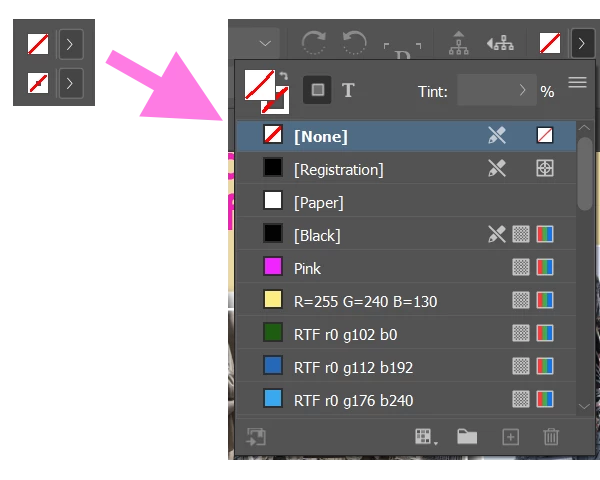


What am I missing, and can anyone help?

I note there is not even an “Adobe Indesign” category in the drop-down list for Feature Requests, so I’d like to know where I’m supposed to be sending this… ?

R A B

    2 replies

    leo.r
    Community Expert
    Community Expert
    August 7, 2026

    You need to reorder the swatches in the Swatches panel, if I understand your question correctly. The dropdown is just a representation of the Swatches panel.

    leo.r
    Community Expert
    Community Expert
    August 7, 2026

    @RONALD21836625ndcl 

    I note there is not even an “Adobe Indesign” category in the drop-down list for Feature Requests, so I’d like to know where I’m supposed to be sending this… ?

    Indeed, for InDesign (and Illustrator) there’s a separate site for bugs and feature requests, UserVoice:
    https://indesign.uservoice.com/

    Unless you’re aware of this, it’s not easy to discover. It’s a mess.

    Plus, in your case, it looks like you don’t even need a feature request. So if you post it on UserVoice, it most likely will get lost and unnoticed. So it’s always better to post your question here first to see if there are solutions already available.