


Known Participant
January 16, 2020
Answered

I want to prompt a user with a save dialog

  • January 16, 2020
  • 2 replies
  • 1475 views

I want to prompt a user with a save dialog, so that they can save a copy of their file, before running some other scripts that will prepare the file but mess with the editability of it.


File.saveDialog()


Prompts me with a save dialog, but no matter what i do, it will not actually save a file. I need this to work on both Windows and macOS.
This topic has been closed for replies.
Correct answer Laubender

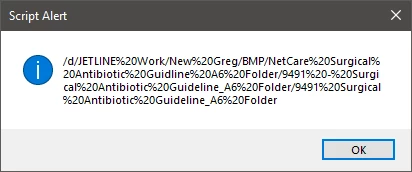
it gives me this path (seems to really not like spaces) more than that it also seems to be missing a "\" at the end of it.


You could construct a new file using the returned folder if you like:

var myCopyOfDocFile = File( myDoc.filePath+"/"+"myNewNameOfTheDoc.indd");

You may check if the new file already exists and react on it:

if( myCopyOfDocFile.exists )
{ /*Prompt the user or change the file's name.*/}


Regards,
Uwe Laubender

( ACP )

2 replies

n0ugh7_zaAuthor
Known Participant
January 16, 2020

Here is what I'm using.

var myDoc = app.activeDocument; 
var location = myDoc.filePath; 
myDoc.saveACopy(location);
    

And this is the error that, it gives me.


Community Expert
January 16, 2020

The first argument of saveACopy() requires a file.

Did you check if myDoc.filePath actually is a file object?


Yes, I know, DOM documentation says that filePath of document returns a File, but you'd better check.

With my tests myDoc.filePath returns a Folder object. So the documentation is wrong on this.


Best see into property fullName of object document for File.


Regards,
Uwe Laubender

( ACP )


n0ugh7_zaAuthor
Known Participant
January 16, 2020

it gives me this path (seems to really not like spaces) more than that it also seems to be missing a "\" at the end of it.

Jongware
Community Expert
Community Expert
January 16, 2020

File.saveDialog indeed calls up a Save dialog. I use this all the time to export content -- it does nothing else but returning a suitable file name.


You are looking for Document.save() (see https://www.indesignjs.de/extendscriptAPI/indesign-latest/#Document.html#d1e49241__d1e54992). If you always want to re-save the current document then you never need to ask for a filename.

n0ugh7_zaAuthor
Known Participant
January 16, 2020

Doesn't seem to be doing anything, Can you use it in context so I can see how the syntax