Participant
August 15, 2018
Question

ID 2015 page tab sheet display

  • August 15, 2018
  • 1 reply
  • 268 views

Dear forum,

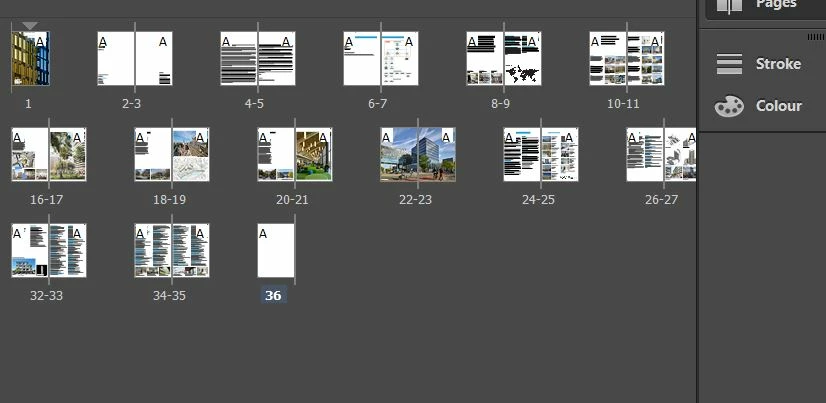
I'm having to work in InDesign CC 2015 (11.1.0.122 x64 build) and in the page tab display there are a number of pages that are missing on the right hand side. On the attached the pages are 12, 13, 14, 15 and 28, 19, 30, 31 are all missing disappearing off the edge.

This happens in all builds of CC 2015 and I'm not able to upgrade to 2018 as not everyone in my organisation has 2018 installed yet.

Any help or guidance would be very helpful please.

Thanks
    This topic has been closed for replies.

    1 reply

    Community Expert
    August 15, 2018

    Hi James,

    first thing you could try is to change the view of your pages from horizontal to vertical in the Pages Panel.

    And then maybe back to horizontal view.

    What operating system do you run?

    Regards,
    Uwe

    Participant
    August 15, 2018

    Uwe

    thank you for your response.

    I’m on Windows 10 Pro.

    I tried as you said. I have the same issue if display as vertical or horizontal is checked. It is very strange.

    Thank you.

    Community Expert
    August 16, 2018

    Hm.

    Will it help if you change the size of the thumbnail images in the panel?

    If not, I fear the next the step would be trashing preferences and caches.

    But before I would test changing workspace or resetting the current workspace.

    I'm on Windows 10, tested with CC 2015.4 and do not see the issue.

    Regards,
    Uwe