Colin Flashman
Community Expert
Community Expert
September 20, 2014
Answered

IDCS6(MAC) 10.9.4 - a script that will make an anchored object and paste in clipboard contents

  • September 20, 2014
  • 2 replies
  • 1210 views

I'm trying to create a script that will create an anchored object that will paste in clipboard contents.

So far I have:

var frameRef = app.selection[0];

    var parentObj = frameRef.insertionPoints.item(0);

    var anchorFrame = parentObj.rectangles.add();

And this works fine, creating an inline object, that can further be defined (with anchor point settings etc).

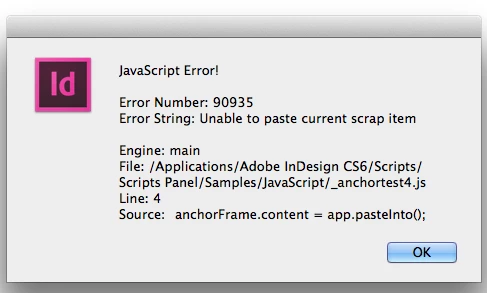
However, it is when I go to use app.paste() or app.pasteInto() that all hell breaks loose.

The line of code I added was:

anchorFrame.content = app.pasteInto();

and the error I get is:

What am I doing incorrectly?

Colin

This topic has been closed for replies.
Correct answer Laubender

@Colin – For the paste command you like to use, you have to:

1. First select an object, in your case the added rectangle object

2. Then use the pasteInto() method from the app object

3. There is no content property for a rectangle object

Watch out what is selected after you added the rectangle.

What you have is a selection of the text frame when you start your code in line one.
Adding a rectangle will not change that selection.

The following code will do the job.

However, if you use pasteInto() the pasted objects could be only partly visible inside the frame.

Depends on the size and position of the added rectangle relative to the original copied page items.

Make sure that you give the rectangle a proper size after or while you are adding it:

var frameRef = app.selection[0];

var parentObj = frameRef.insertionPoints.item(0);

//Will add a rectangle sized 40 x 40 mm

var anchorFrame = parentObj.rectangles.add({geometricBounds:[0,0,"40mm","40mm"]});

app.select(null); //Optional

app.select(anchorFrame);

app.pasteInto();

Uwe

2 replies

Jump_Over
Legend
September 20, 2014

Hi,

app.pasteInto() is a method and it pastes a clipboard into selected object (like in UI).

So first select an object ==> second call a method.


anchorFrame.select();

app.pasteInto();

(assumes correct clipboard content)

Jarek

PS. Ups...:)

LaubenderCommunity ExpertCorrect answer
Community Expert
September 20, 2014

@Colin – For the paste command you like to use, you have to:

1. First select an object, in your case the added rectangle object

2. Then use the pasteInto() method from the app object

3. There is no content property for a rectangle object

Watch out what is selected after you added the rectangle.

What you have is a selection of the text frame when you start your code in line one.
Adding a rectangle will not change that selection.

The following code will do the job.

However, if you use pasteInto() the pasted objects could be only partly visible inside the frame.

Depends on the size and position of the added rectangle relative to the original copied page items.

Make sure that you give the rectangle a proper size after or while you are adding it:

var frameRef = app.selection[0];

var parentObj = frameRef.insertionPoints.item(0);

//Will add a rectangle sized 40 x 40 mm

var anchorFrame = parentObj.rectangles.add({geometricBounds:[0,0,"40mm","40mm"]});

app.select(null); //Optional

app.select(anchorFrame);

app.pasteInto();

Uwe

Colin Flashman
Community Expert
Community Expert
September 20, 2014

Thank you Uwe, that did the trick!

I've added one line at the end so that whatever objects were pasted into the frame now fit the content:

app.menuActions.item("$ID/Fit Frame to Content").invoke();

I'm sure there is a better way of writing that line, as I'm sure that line won't work for people who aren't using the English version of InDesign.

If the answer wasn't in my post, perhaps it might be on my blog at colecandoo!
Community Expert
September 20, 2014

@Colin – no. If it will work for you, the line will work for every localized version of InDesign (the "$ID/" part of the string is hinting at that).

Uwe