Participant
December 23, 2019
Answered

IDML missing links

  • December 23, 2019
  • 7 replies
  • 2835 views

Mac OS Mojave. INDD 2020. (Also with previous versions.)

Save a INDD file as IDML when all linked images are "up to date". Reopen IDML in same or other INDD version, frames of some images are visible, but content is missing. There is even no link in the links panel. Occurs when "save as" IDML; when package + IDML, with and without relink images.

Occurs when files are stored on server or when stored on local computer.

Only constant I have been able to find is that these images are rotated or flipped.

Don't tell me this is "expected behaviour" or a limitation of the IDML format....
This topic has been closed for replies.
Correct answer vladan saveljic

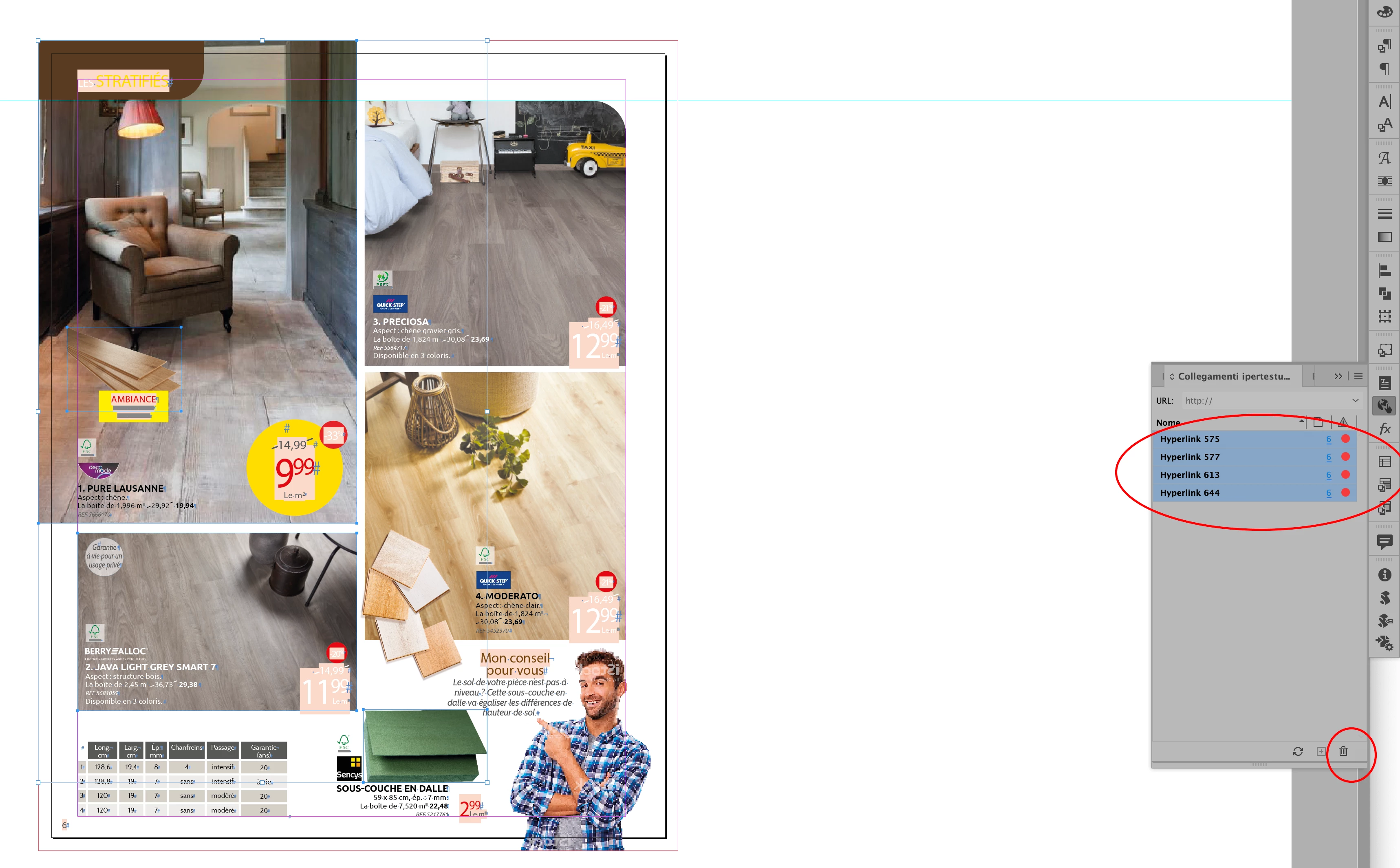
Seems to be missing hyperlinks
Select the missing hyperlinks, delete them and try again to save as idml and then open the file


7 replies

Community Expert
December 27, 2019

I tried to recreate the issue with placed images and URLs that are valid in notation but lead to errors in the Hyperlinks panel. The exported IDML file was fine. It opened without losing any links of the placed images.


However, if I edited the URL to something like IMG_Path3 instead of e.g. http://www.adobe.hl that leads to a red dot, but otherwise wasn't an issue with the IDML, the images were missing after opening the IDML with InDesign.


Here the source INDD document with a hyperlink where the URL is IMG_Path3:


The exported IDML opened:

The frame looks like a graphic frame that is ready for a data merge.


On the other hand here the sample in the INDD source document with a URL where the notation is URL-like:


As we can see below or from the screenshot of the opened IDML the placed image is still visible in the Links panel:


Regards,
Uwe Laubender

( ACP )

Community Expert
December 27, 2019

Hi Rudi,

I would report this issue as bug in category Idml export even if it seems that it is an Idml import issue:

https://indesign.uservoice.com/forums/601180-adobe-indesign-bugs?category_id=209059


Best add a link to the report that is leading to this thread.


Regards,
Uwe Laubender

( ACP )

vladan saveljic
vladan saveljicCorrect answer
Inspiring
December 24, 2019

Seems to be missing hyperlinks
Select the missing hyperlinks, delete them and try again to save as idml and then open the file


Participant
December 24, 2019

Thanks for pointing this out.

Indeed pages are first generated via EasyCatalog, but afterwords all Field Markers are deleted.

Several Fields are paths to images. Didn't realise these were treated as Hyperlinks.

Will have to include a step in the workflow to delete all Hyperlinks afterwards.

Participant
December 24, 2019

This download link with example is valid till December 31 2019:

https://we.tl/t-LVx183pxK5


Community Expert
December 23, 2019

Hi Rudi,

I cannot recreate your issues with InDesign on Windows 10.

If you are seeing this with all your files could you make one available with a sample image?

Put it on Dropbox or a service like that and post the download link so that we can test something.


Thanks,
Uwe Laubender

( ACP )

Geоrge
Legend
December 23, 2019

>> Don't tell me this is "expected behaviour" or a limitation of the IDML format....

Oh, you don't know that idml can broke all object layer options as "expected behaviour". He can. 

Remember, never say you can't do something in InDesign, it's always just a question of finding the right workaround to get the job done. © David Blatner
Community Expert
December 23, 2019