dublove
Legend
August 9, 2024
Answered

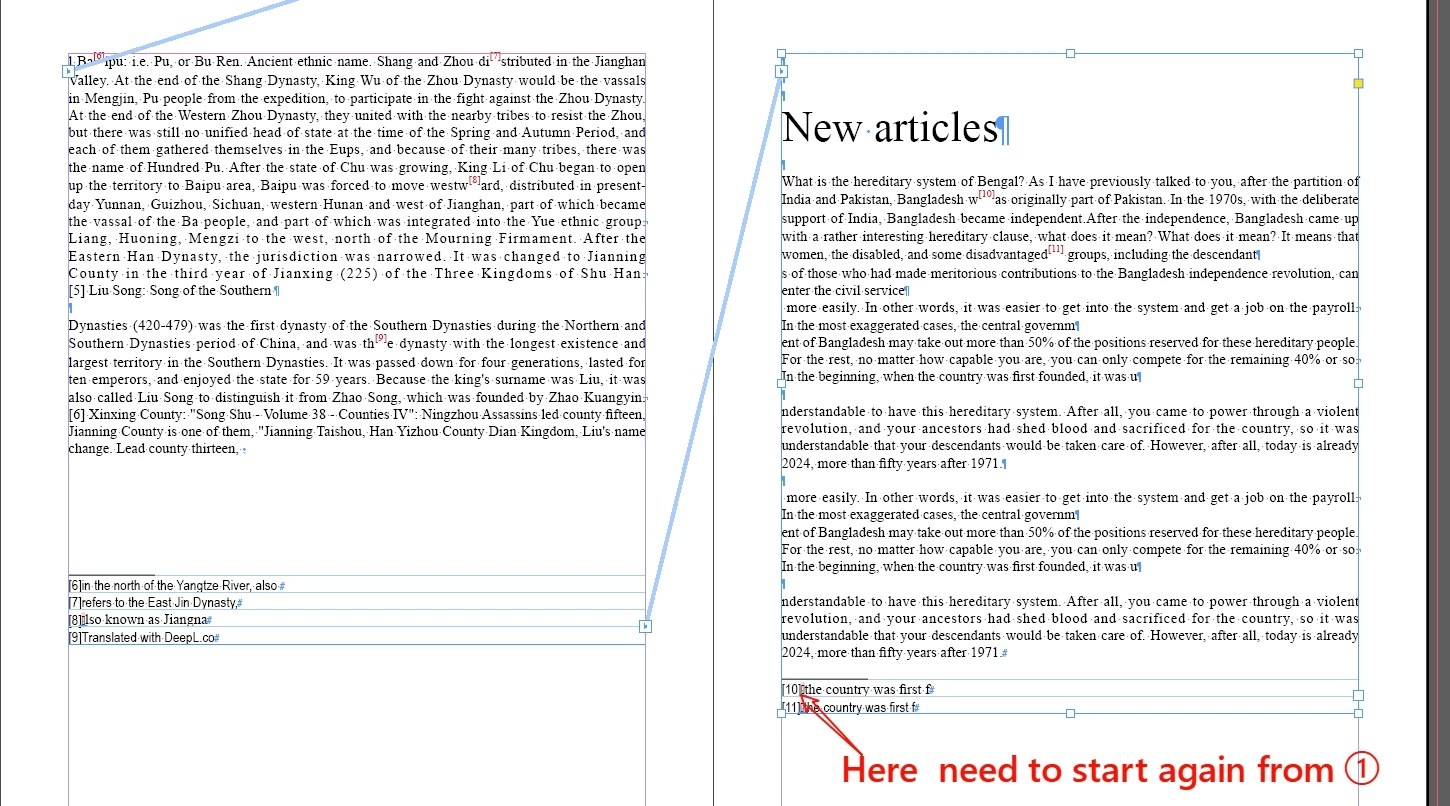
If the two text boxes are connected, how does the footnote restart from ①

  • August 9, 2024
  • 3 replies
  • 644 views

I have a book that needs to be typeset that is single-column and contains footnotes, but the footnotes start at ① for each article.

I don't want to go through and break up each article. I'd like to typeset it in just one text box, but it seems like the footnotes can only be connected.

Is there any solution to this?

This topic has been closed for replies.
Correct answer Peter Kahrel

Here's a script I use to break a story on instances of a paragraph style. It assumes that the paragraph is set to start on the next page or frame.


To use it, place the cursor in the paragraph style (the one applied to 'New Articles' in your sample) and run the script. As always, keep a copy of the document in a safe place.


//DESCRIPTION: Split a story on the selected paragraph style

(function () {

  var styleName = app.selection[0].appliedParagraphStyle.name;
  var story = app.selection[0].parentStory;
  var p = story.paragraphs.everyItem().getElements();
  var frame;

  for (var i = p.length-1; i >= 1; i--) {
    if (p[i].appliedParagraphStyle.name === styleName) {
      frame = p[i].parentTextFrames[0];
      frame.previousTextFrame = null;
      story.insertionPoints.itemByRange (p[i].index, story.length)
        .move (LocationOptions.AFTER, frame.insertionPoints[0]);
    }
  }

}());


3 replies

Robert at ID-Tasker
Legend
August 9, 2024

@dublove


It's not free and PC only: 


https://id-tasker.com/2024/05/12/mixing-auto-custom-footnotes/ 


Can be easily adapted to your needs - although I would have to add support for extra characters around the Footnote marker. 


Peter Kahrel
Community Expert
Peter KahrelCommunity ExpertCorrect answer
Community Expert
August 9, 2024

Here's a script I use to break a story on instances of a paragraph style. It assumes that the paragraph is set to start on the next page or frame.


To use it, place the cursor in the paragraph style (the one applied to 'New Articles' in your sample) and run the script. As always, keep a copy of the document in a safe place.


//DESCRIPTION: Split a story on the selected paragraph style

(function () {

  var styleName = app.selection[0].appliedParagraphStyle.name;
  var story = app.selection[0].parentStory;
  var p = story.paragraphs.everyItem().getElements();
  var frame;

  for (var i = p.length-1; i >= 1; i--) {
    if (p[i].appliedParagraphStyle.name === styleName) {
      frame = p[i].parentTextFrames[0];
      frame.previousTextFrame = null;
      story.insertionPoints.itemByRange (p[i].index, story.length)
        .move (LocationOptions.AFTER, frame.insertionPoints[0]);
    }
  }

}());

dublove
dubloveAuthor
Legend
August 9, 2024

Hi Peter Kahrel

Thank you

You're too good and invincible to think of that.

Peter Kahrel
Community Expert
Community Expert
August 9, 2024

If you want the footnotes to restart at each chapter you'll have to break the story up so that each chapter is in a different story. To keep everything in one story you need a very messy script.


Join the crowds on https://indesign.uservoice.com who've requested more flexibility in InDesign's footnote numbering.

dublove
dubloveAuthor
Legend
August 9, 2024

It would be nice if it could be split by "page breaks(~P)" or "frame breaks(~R)" or "column breaks(~M)".


Peter Kahrel
Community Expert
Community Expert
August 9, 2024

Yes, it would, wouldn't it?