
Question
Illustrator images showing gray fill in InDesign
I am creating simple line diagrams in Illustrator and importing them into InDesign. The fill in Illustrator is set to either none or white -- I've tried both. Both Illustrator and InDesign are set to CMYK.
When I import the ai file into InDesign, the fill is shown as gray.
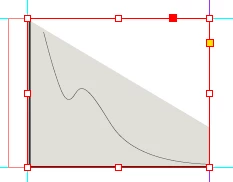
This is not a screen-only artifact. It is reproduced in a print.
I can work around the problem by exporting to tiff but I would prefer not to do that since this book is going to be professionally published and I don't want to risk pixelising the image.
I don't see anyone else having this problem and it seems it should be common. So I imagine I am doing something wrong but I have no idea what.


 AdChoices