
Participant
July 28, 2021
Answered

Image drops below anchored text when exporting to epub

  • July 28, 2021
  • 1 reply
  • 320 views

I've been trying to add images to my ebook in InDesign. I was able to get it to work, but when I added a table of contents (it's gone now) all of the images would drop BELOW the anchored text, even though it is anchored to before the first letter of said anchored text. 


I'm trying to figure out what changed, but so far everything is the same except I added a table of contents. Am I doing something wrong? The image is above the textbox and is anchored to before the first letter within the textbox. 


Thank you!
This topic has been closed for replies.
Correct answer Linnea5E63

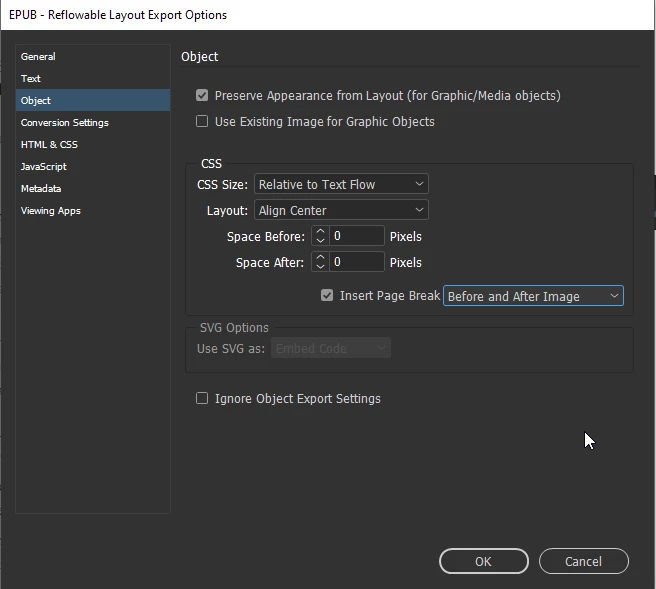
Hmmmm... yes, I've gone back and forth with this myself on anchored images for reflowable. Does it make any difference if you insert a page break before and after images? Also, what viewer are you using to look at your epub and what viewers will the reader be using? Since that can vary, I've had good results inspecting and sometimes adjusting epubs after export using calibre - E-book management (calibre-ebook.com)


It does, but then it puts a page break where I don't want them. 


I ended up going to an old version of the document and redoing it. It's working now. No idea what went wrong. I used Apple Books, Calibre, and my kindle to check.

1 reply

J E L
Community Expert
Community Expert
July 28, 2021

@Linnea5E63 Are you working on a fixed or reflowable epub export? If reflowable, check your Export Tags. If you can, show us your export screens like this:


Participant
July 28, 2021

I'm working with reflowable epub export. 


When I go back to the original document and redo the formatting it works, so there's something off about the document itself. But here are the two export screens I've adjusted:


J E L
Community Expert
Community Expert
July 28, 2021

Hmmmm... yes, I've gone back and forth with this myself on anchored images for reflowable. Does it make any difference if you insert a page break before and after images? Also, what viewer are you using to look at your epub and what viewers will the reader be using? Since that can vary, I've had good results inspecting and sometimes adjusting epubs after export using calibre - E-book management (calibre-ebook.com)