
February 5, 2026
Answered

Image size and document size not matching?

  • February 5, 2026
  • 7 replies
  • 203 views

Hi, not sure if I’m having an off day or not here. I asked a college and they were also puzzled.


I’m placing high resolution images into Indesign.

The document size without a doubt is 1920x1080 px.

The Images are large stock images, bigger than this document size at 300ppi.

When placed at 100% these images are smaller than the document?


For example: 

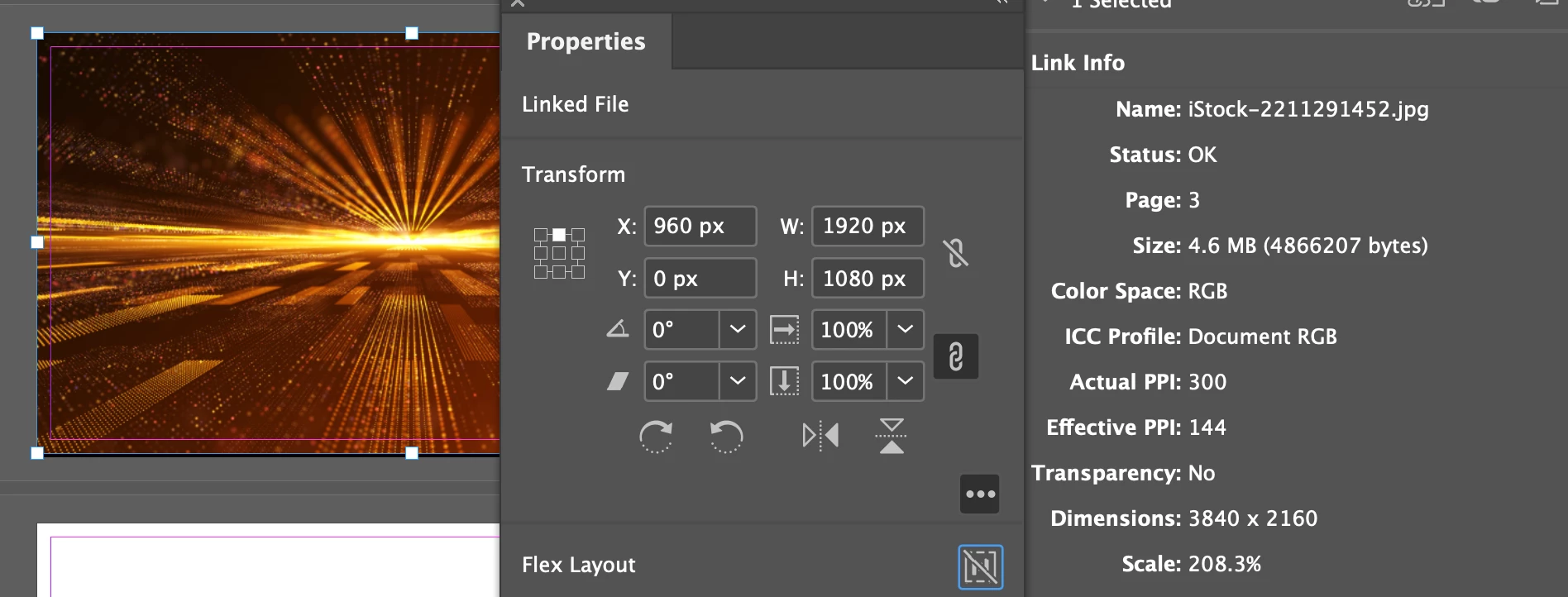
One image is 3840x2160 px at 300ppi. When placed into a 1920x1080px document making it the full page size indesign says it is 208.3% scaled, and the effective ppi is 144? 


This makes no sense, the effective ppi should exceed 300, and the scale should be less than 100%?! 


See link panel and item selection image for details.

Please help.
 

    Correct answer rob day

    @rob day Hi ​@Barb Binder , There’s this? 

     I think the confusion comes from the assumption that InDesign’s chosen ruler units affect the page’s output or export resolution

    7 replies

    Barb Binder
    Community Expert
    Community Expert
    February 7, 2026

    Indesign is interpreting the data wrong and I’m trying to figure out why


    I looked into this question recently for someone else and read variety of posts on the topic. I feel fairly certain that this is my paraphrased takeaway from one of ​@rob day’s old posts (that I can’t find today) and I didn’t see it in ​@leo.r’s list.  

    • Pixels were added to InDesign in one of the late CS versions (CS5 or 6) and were meant to export web assets from InDesign.
    • Pixels were never intended to be used for importing images, and when used, the result would always be smaller than expected. 
    • This confusion is predictable because seeing pixels as a page measurement option makes it feel like InDesign pages have resolution, but they don’t. 
    ~Barb at Rocky Mountain Training
    leo.r
    Community Expert
    Community Expert
    February 8, 2026

    I also think it’s actually a good case to show one of those blue info bars that would warn the user about possible discrepancies and provide a link with a more in-depth explanation of pixel measurements in InDesign.

    rob day
    Community Expert
    rob dayCommunity ExpertCorrect answer
    Community Expert
    February 8, 2026

    @rob day Hi ​@Barb Binder , There’s this? 

     I think the confusion comes from the assumption that InDesign’s chosen ruler units affect the page’s output or export resolution

    Scott Falkner
    Community Expert
    Community Expert
    February 7, 2026

    I believe the problem here is an error is InDesign’s use of the word Pixels as a unit. InDesign does not use pixels as a unit. It uses something called pixels, but those are points. In inDesign’s rulers a pixel is always 1/72 inch. If you place a 100 pixel by 100 pixel image in InDesign it will come in at the size that matches the ppi metadata in the file. If the image’s resolution is 72 ppi it will be 1 inch square. This is 72 points square, or 72 pixels square in the units InDesign erroneously calls pixels. If the image is 300 ppi it will be 0.24 inches square, or 17.28 square points or 17.28 square erzatz-pixels.

    rob day
    Community Expert
    Community Expert
    February 6, 2026

    Indesign is interpreting the data wrong and I’m trying to figure out why


    A page can contain images with different resolutions. On an export to PDF you can choose to keep the different resolutions, or down sample to a chosen, uniform resolution.


    You can set up the Links panel to show the Actual or Effective (output) Resolutions of placed images. This 8.5” x 11” page has placed images with different output resolutions—275, 789, and 1202 PPI:


    korra.kAuthor
    February 6, 2026

    Just a note, because none of the replies so address the query at hand.

    Indesign is interpreting the data wrong and I’m trying to figure out why

    Dumbing it down to entry level designing for web or print is irrelevant here.

    leo.r
    Community Expert
    Community Expert
    February 6, 2026

    You will not get the results you believe you should get if you apply pixel measurements to projects that are intended for print. Just like you won’t measure your own height in pixels because it doesn’t make any sense in the physical world.


    Pixel dimensions of an image do not change when you resize it in InDesign. Only its effective resolution changes. The fact that you happen to set your InDesign rulers to pixels does not change this.


    As a test, you can change the resolution of your image in Photoshop to 72 ppi without resampling.


    Then place it in your 1920x1080 px InDesign document. It will occupy the area you expect it to occupy. However, if you scale the image down, its pixel dimensions will not change regardless of what you see in the InDesign rulers that you’ve set to pixels.


    So. Change your InDesign document measurements to inches or millimeters (as has already been mentioned). If you see any discrepancies in the image size, then you have a case for concern which you can report back here.  

    rob day
    Community Expert
    Community Expert
    February 5, 2026

    Hi ​@korra.k , Also, a placed image has an Actual and Effective Pixels Per Inch resolution, which could be anythingIts easier to see the effect of scaling an image if you set your rulers to Inches rather than Pixels:


    3840/300 = 12.8:


    BobLevine
    Community Expert
    Community Expert
    February 5, 2026

    It makes perfect sense when you understand that when designing for pixels, InDesign assumes that your images are 72 ppi. Why are you working pixels? That’s for web use, not print where actual and effective PPI are meaningless.

    leo.r
    Community Expert
    Community Expert
    February 5, 2026

    I assume you’re designing for print, so you need to use physical (non-pixel) measurement units in InDesign, such as inches, millimeters, etc.


    InDesign is different from Photoshop; for starters, its documents don’t have a resolution. When you set rulers to pixels, you deal with a pixel view at 72 ppi. In general, InDesign is not a robust tool for working in pixel-based mode. I’m sure others will provide deeper insights.


    Here are some other discussions on the subject: