
gggraphicsEvan
Participant
May 30, 2018 3:58 PM UTC
Answered

Images placing cropped/incorrect sizes - how to fix?

Hello,

I'm having a problem where InDesign is placing images cropped and sized differently from their initial frames, which is a nuisance, and requires running "Fit Frame to Content" to fix whenever I place an image link. I have a screenshot attached showing the initial placement/cropping, and then the actual image links after resizing the frames to the actual dimensions of the link. I have never had this happen before. Does anyone know how to fix this, or experienced this before?
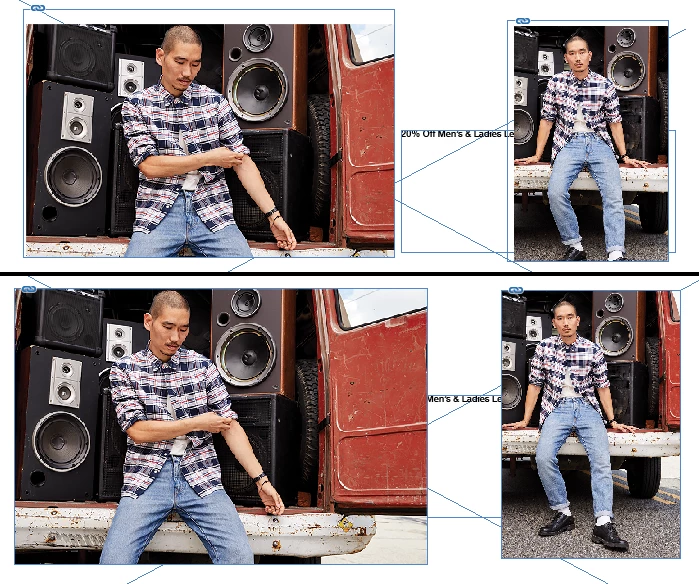
This topic is closed to new replies. Start a new post to keep the conversation going.
LaubenderCorrect answer
Community Expert
May 30, 2018 4:01 PM UTC

Hi,

check the frame fitting options.

Can you show a screenshot of that before you place an image?

Regards,
Uwe

2 replies

LaubenderCommunity ExpertCorrect answer
Community Expert
May 30, 2018 4:01 PM UTC

Hi,

check the frame fitting options.

Can you show a screenshot of that before you place an image?

Regards,
Uwe

Translate
gggraphicsEvan
Participant
May 30, 2018 4:15 PM UTC

That did it! Under Frame Fitting Options, it had somehow been set to crop by default. By deselecting any objects and then removing the crop settings under Object/Frame/Frame Fitting Options, the problem is gone! Thank you!

Article: Work with frames and objects in InDesign

Translate